• Microsoft Office
  • Microsoft Windows
  • Other Software
    • Microsoft Visual
    • Microsoft Project
    • Microsoft Visio
    • Anti Virus
  • Blog
    • Word
    • Excel
    • Powerpoint
    • Software tricks/tips

No products in the cart.

  • Microsoft Office
  • Microsoft Windows
  • Other Software
    • Microsoft Visual
    • Microsoft Project
    • Microsoft Visio
    • Anti Virus
  • Blog
    • Word
    • Excel
    • Powerpoint
    • Software tricks/tips

No products in the cart.

  • Microsoft Office
  • Microsoft Windows
  • Other Software
    • Microsoft Visual
    • Microsoft Project
    • Microsoft Visio
    • Anti Virus
  • Blog
    • Word
    • Excel
    • Powerpoint
    • Software tricks/tips

No products in the cart.

  • Microsoft Office
  • Microsoft Windows
  • Other Software
    • Microsoft Visual
    • Microsoft Project
    • Microsoft Visio
    • Anti Virus
  • Blog
    • Word
    • Excel
    • Powerpoint
    • Software tricks/tips
Excel

How to fix Excel not displaying (unhiding) hidden rows or columns
0 Comments

How to fix Excel not displaying (unhiding) hidden rows or columns: When working on an Excel worksheet, there are times when a row or column is clearly hidden, but you cannot unhide it to display the hidden rows and columns. There are many reasons why this error may occur, such as due to the row/column size being too small or due to the use of the Filter tool. This article will guide you on how to handle these situations.

1. When you cannot unhide a hidden row or column due to its size being too small

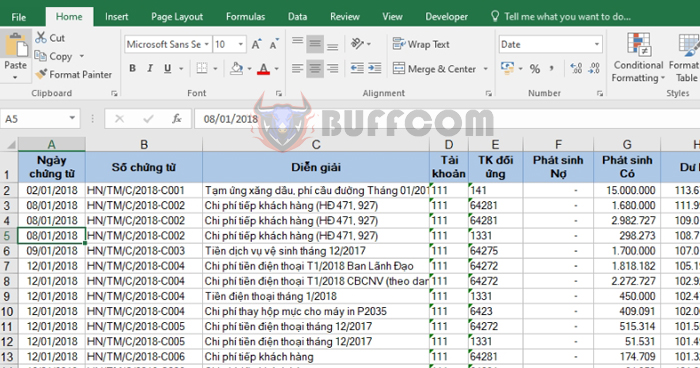
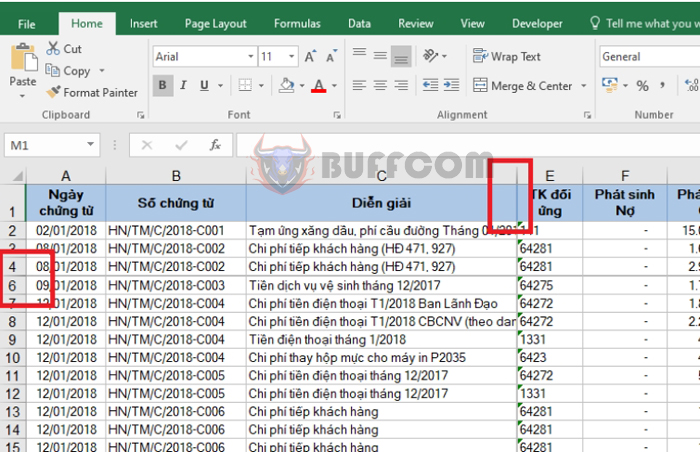
Looking at the image below, you can see that column D and row 5 are hidden due to their small size. In this case, even if you select both columns C and E or rows 4 and 6 and right-click and choose Unhide, column D and row 5 will not be displayed.
How to fix Excel not displaying (unhiding) hidden rows or columns

How to fix Excel not displaying (unhiding) hidden rows or columns

To display column D, you need to adjust the column width by moving your mouse to the midpoint between two columns. When the mouse cursor turns into a two-way arrow, drag the column width out. Alternatively, you can double-click the left mouse button to automatically adjust the column width.
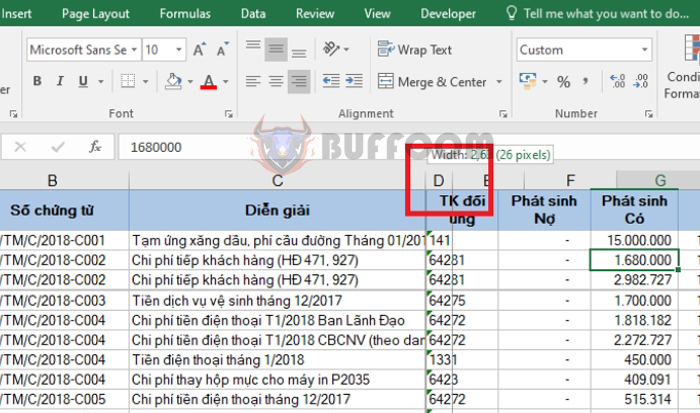
How to fix Excel not displaying unhiding hidden rows or columns2Similarly, do the same to show row 5.

How to fix Excel not displaying unhiding hidden rows or columns32. When you cannot unhide a hidden row due to filtering by the Filter tool

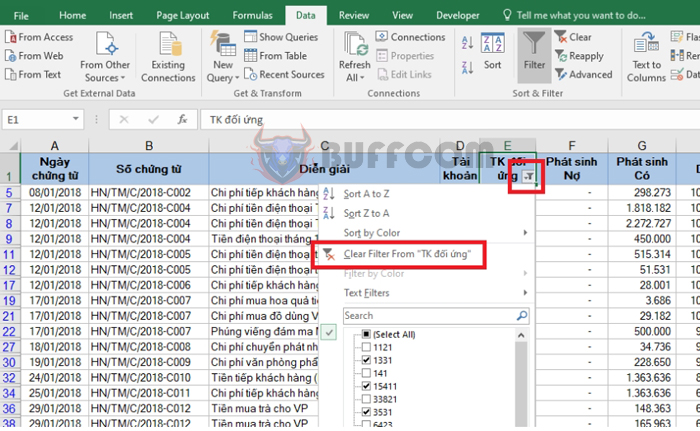
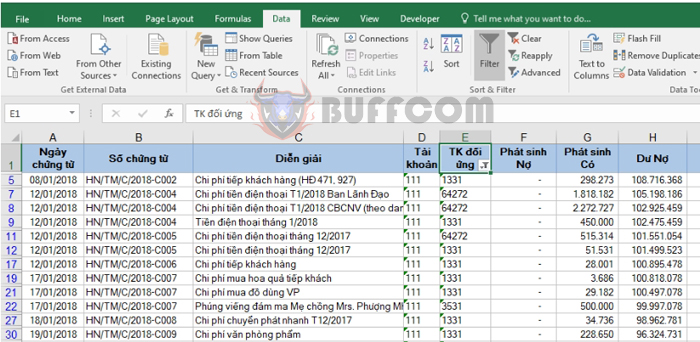
Looking at the worksheet in the image below, you can see that many rows are hidden, and you can see that the Filter tool is enabled in column E.
How to fix Excel not displaying unhiding hidden rows or columns4
In this case, even if you select the entire worksheet and unhide it, you cannot display the hidden rows. What you need to do to display these hidden rows is to turn off the filter results.

To turn off the filter results, click on the Filter icon in cell E1. Then select Clear Filter From…

How to fix Excel not displaying unhiding hidden rows or columns5Alternatively, you can simply turn off the Filter tool by selecting the Data tab. Then click on the Filter icon in the Sort & Filter section.

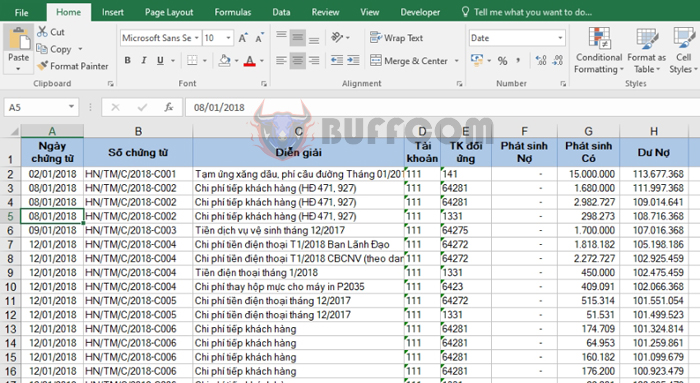
How to fix Excel not displaying unhiding hidden rows or columns6The result is that the hidden rows that were hidden by the Filter results are now displayed.
How to fix Excel not displaying (unhiding) hidden rows or columns

How to fix Excel not displaying (unhiding) hidden rows or columns

Thus, this article has pointed out the cases where an Excel worksheet cannot be unhidden, and how to handle these cases. We hope this article will be useful to you when working on Excel. Good luck!

Rate this post
48
296 Views
How to create a diagonal line to divide an Excel cell into two triangular cellsPrevHow to create a diagonal line to divide an Excel cell into two triangular cellsMay 8, 2023
How to convert data from rows to columns (and vice versa) in ExcelMay 8, 2023How to convert data from rows to columns (and vice versa) in ExcelNext

Leave a Reply Cancel reply

You must be logged in to post a comment.

Buy Windows 11 Professional MS Products CD Key
Buy Office 2021 Professional Plus Key Global For 5 PC
Top rated products
  • Kaspersky Internet Security 2021 1 year 5 devices key Global Kaspersky Internet Security 2021 1 year 5 devices key Global
    Rated 5.00 out of 5
    $45.00
  • Windows Server 2022 Datacenter Key Global Windows Server 2022 Datacenter Key Global
    Rated 5.00 out of 5
    $7.00
  • Kaspersky Small Office Security 10 PCs + 10 Mobiles + 1 Server 1 Year Kaspersky Small Office Security 10 PCs + 10 Mobiles + 1 Server 1 Year
    Rated 5.00 out of 5
    $164.50
  • Avast Ultimate Suite 2021 1 Year 10 Devices Global Avast Ultimate Suite 2021 1 Year 10 Devices Global
    Rated 5.00 out of 5
    $54.00
  • Windows 11 Pro Key Global Windows 11 Pro Key Global
    Rated 5.00 out of 5
    $6.00
Products
  • AVG Ultimate 2021 with Antivirus + Cleaner, Secure VPN 10 Devices 1 Year AVG Ultimate 2021 with Antivirus + Cleaner, Secure VPN 10 Devices 1 Year
    Rated 4.91 out of 5
    $34.00
  • Windows Server 2012 R2 Standard Key Global Windows Server 2012 R2 Standard Key Global
    Rated 4.78 out of 5
    $15.00
  • Buy Windows 11 Professional MS Products CD Key Buy Windows 11 Professional MS Products CD Key
    Rated 5.00 out of 5
    $6.00
  • Windows 11 Pro Key Global Windows 11 Pro Key Global
    Rated 5.00 out of 5
    $6.00
  • Windows 11 Pro Product Activation Key Windows 11 Pro Product Activation Key
    Rated 5.00 out of 5
    $6.00
  • Microsoft Project Standard 2019 - 1 PC Microsoft Project Standard 2019 - 1 PC $12.00
  • Windows Server 2008 R2 Standard Windows Server 2008 R2 Standard $10.00
  • Office 2024 Home and Student Office 2024 Home and Student $88.00
  • Kaspersky Small Office Security 20 PCs + 20 Mobiles + 2 Servers 1 Year Kaspersky Small Office Security 20 PCs + 20 Mobiles + 2 Servers 1 Year $284.73
  • Windows Server 2016 Essentials Key Global Windows Server 2016 Essentials Key Global
    Rated 4.79 out of 5
    $10.00
Product categories
  • Anti Virus
  • Microsoft Office
  • Microsoft Project
  • Microsoft Visio
  • Microsoft Visual
  • Microsoft Windows
  • Other Software
  • Uncategorized

Buffcom.net always brings the best digital products and services to you. Specializing in Office Software and online marketing services

BIG SALE 50% IN MAY

Microsoft Office
Microsoft Windows
Anti-Virus
Contact Us

Visit Us:

125 Division St, New York, NY 10002, USA

Mail Us:

buffcom.net@gmail.com

TERMS & CONDITIONS | PAYMENT GUIDE  | SHIPPING POLICY  | REFUND POLICY

Copyright © 2019 buffcom.net  All Rights Reserved.