
• Microsoft Office
  • Microsoft Windows
  • Other Software
    • Microsoft Visual
    • Microsoft Project
    • Microsoft Visio
    • Anti Virus
  • Blog
    • Word
    • Excel
    • Powerpoint
    • Software tricks/tips

No products in the cart.

  • Microsoft Office
  • Microsoft Windows
  • Other Software
    • Microsoft Visual
    • Microsoft Project
    • Microsoft Visio
    • Anti Virus
  • Blog
    • Word
    • Excel
    • Powerpoint
    • Software tricks/tips

No products in the cart.

  • Microsoft Office
  • Microsoft Windows
  • Other Software
    • Microsoft Visual
    • Microsoft Project
    • Microsoft Visio
    • Anti Virus
  • Blog
    • Word
    • Excel
    • Powerpoint
    • Software tricks/tips

No products in the cart.

  • Microsoft Office
  • Microsoft Windows
  • Other Software
    • Microsoft Visual
    • Microsoft Project
    • Microsoft Visio
    • Anti Virus
  • Blog
    • Word
    • Excel
    • Powerpoint
    • Software tricks/tips
Excel

Using 3D References in Excel for Time Savings
0 Comments

Utilizing 3D references in Excel can significantly save you time. It’s akin to a three-dimensional chart or image with multiple layers. A regular range refers to a group of cells within a single worksheet. For instance, in the formula =SUM(Sheet1!A1:A10), “A1:A10” represents a group of cells referenced from Sheet1.

However, a 3D reference allows you to refer to the same cell or range from multiple worksheets using a single reference. In other words, you can create a range that spans across multiple sheets.

Creating a 3D Reference

Before using a 3D reference, ensure that all the worksheets are arranged in a sequence. Let me illustrate with an example.

Using 3D References in Excel for Time Savings

Using 3D References in Excel for Time Savings

Suppose you have five worksheets in a workbook. To calculate the sum of the range C5:D6 from all five worksheets, you would use a formula like this:

=(‘2009′!C5:D6,’2010′!C5:D6,’2011′!C5:D6,’2012′!C5:D6,’2013’!C5:D6)

However, if you want to create a 3D formula with a 3D reference, it would look like this:

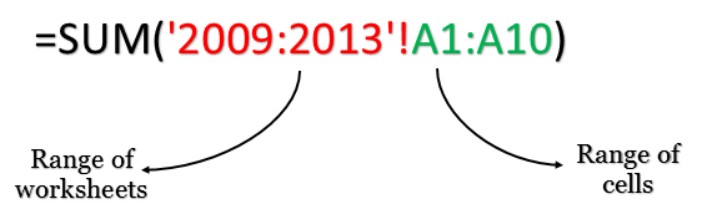
=SUM(‘2009:2013’!C5:D6)

How 3D Reference Works in Excel

A 3D range formula operates in two parts:
Using 3D References in Excel for Time Savings

Using 3D References in Excel for Time Savings

First: Range of worksheets – Similar to a range of cells, you need to define a range of worksheets from which you want to reference cells. The range of worksheets must be continuous. In the above example, the range spans from 2009 to 2013, encompassing five worksheets.

Second: Range of cells – This refers to the normal range of cells that you want to include from all the worksheets.

Adding or Deleting Worksheets

Suppose you insert a worksheet between 2009 and 2013. The range A1:A10 from the new sheet will be automatically included in the 3D reference formula you are using.3D References 3

If you delete a worksheet from the range 2009 to 2013, the value of the cell C4 from that worksheet will be automatically excluded from the formula.

Sequence of Worksheets

In this example, the range of worksheets begins from “Sheet 2009” and ends at “Sheet 2013.” It’s important to note that if you move any sheet out of this range, it will be excluded from the calculation in the formula.

Conclusion

One of the significant advantages of using 3D references in Excel is the ability to simplify complex formulas. You no longer need to refer to each worksheet separately within the formulas. I hope this method will help you write more efficient formulas.

Now, let me ask you a question. Have you tried using 3D references in Excelbefore? Please share your thoughts in the comments section. I’d love to hear from you. And don’t forget to share this knowledge with your friends.

Rate this post
60
313 Views
Calculating VAT in ExcelPrevCalculating VAT in ExcelMay 19, 2023
Applying WordArt Text Effects to Make Presentations More AttractiveMay 19, 2023Applying WordArt Text Effects to Make Presentations More AttractiveNext

Leave a Reply Cancel reply

You must be logged in to post a comment.

Buy Windows 11 Professional MS Products CD Key
Buy Office 2021 Professional Plus Key Global For 5 PC
Top rated products
  • Kaspersky Internet Security 2021 1 year 5 devices key Global Kaspersky Internet Security 2021 1 year 5 devices key Global
    Rated 5.00 out of 5
    $45.00
  • Windows Server 2022 Datacenter Key Global Windows Server 2022 Datacenter Key Global
    Rated 5.00 out of 5
    $7.00
  • Kaspersky Small Office Security 10 PCs + 10 Mobiles + 1 Server 1 Year Kaspersky Small Office Security 10 PCs + 10 Mobiles + 1 Server 1 Year
    Rated 5.00 out of 5
    $164.50
  • Avast Ultimate Suite 2021 1 Year 10 Devices Global Avast Ultimate Suite 2021 1 Year 10 Devices Global
    Rated 5.00 out of 5
    $54.00
  • Windows 11 Pro Key Global Windows 11 Pro Key Global
    Rated 5.00 out of 5
    $6.00
Products
  • Office 2024 Home And Business For Mac/Pc Bind Office 2024 Home And Business For Mac/Pc Bind $110.00
  • Office 2024 Home and Student Office 2024 Home and Student $88.00
  • Trend Micro Maximum Security 3 Devices 1 Year key Global Trend Micro Maximum Security 3 Devices 1 Year key Global
    Rated 5.00 out of 5
    $15.00
  • Windows Server 2022 Remote Desktop Services User Connections (50) Cal Key Global Windows Server 2022 Remote Desktop Services User Connections (50) Cal Key Global
    Rated 5.00 out of 5
    $22.00
  • Kaspersky Total Security 2021 1 year 1 device key Global Kaspersky Total Security 2021 1 year 1 device key Global
    Rated 5.00 out of 5
    $27.00
  • Microsoft Visio Professional 2010 Key 1PC Microsoft Visio Professional 2010 Key 1PC $9.00
  • Buy Windows Server 2016 Essentials Key Global Buy Windows Server 2016 Essentials Key Global
    Rated 4.75 out of 5
    $10.00
  • Windows 11 Home Key Global 2021 Windows 11 Home Key Global 2021
    Rated 5.00 out of 5
    $6.00
  • Avast Ultimate Suite 2021 3 Years 10 Devices Global Avast Ultimate Suite 2021 3 Years 10 Devices Global
    Rated 5.00 out of 5
    $90.00
  • Windows 11 Pro Key Global Windows 11 Pro Key Global
    Rated 5.00 out of 5
    $6.00
Product categories
  • Anti Virus
  • Microsoft Office
  • Microsoft Project
  • Microsoft Visio
  • Microsoft Visual
  • Microsoft Windows
  • Other Software
  • Uncategorized

Buffcom.net always brings the best digital products and services to you. Specializing in Office Software and online marketing services

BIG SALE 50% IN MAY

Microsoft Office
Microsoft Windows
Anti-Virus
Contact Us

Visit Us:

125 Division St, New York, NY 10002, USA

Mail Us:

buffcom.net@gmail.com

TERMS & CONDITIONS | PAYMENT GUIDE  | SHIPPING POLICY  | REFUND POLICY

Copyright © 2019 buffcom.net  All Rights Reserved.