• Microsoft Office
  • Microsoft Windows
  • Other Software
    • Microsoft Visual
    • Microsoft Project
    • Microsoft Visio
    • Anti Virus
  • Blog
    • Word
    • Excel
    • Powerpoint
    • Software tricks/tips

No products in the cart.

  • Microsoft Office
  • Microsoft Windows
  • Other Software
    • Microsoft Visual
    • Microsoft Project
    • Microsoft Visio
    • Anti Virus
  • Blog
    • Word
    • Excel
    • Powerpoint
    • Software tricks/tips

No products in the cart.

  • Microsoft Office
  • Microsoft Windows
  • Other Software
    • Microsoft Visual
    • Microsoft Project
    • Microsoft Visio
    • Anti Virus
  • Blog
    • Word
    • Excel
    • Powerpoint
    • Software tricks/tips

No products in the cart.

  • Microsoft Office
  • Microsoft Windows
  • Other Software
    • Microsoft Visual
    • Microsoft Project
    • Microsoft Visio
    • Anti Virus
  • Blog
    • Word
    • Excel
    • Powerpoint
    • Software tricks/tips
Excel

How to create a fun people chart in Microsoft Excel
0 Comments

A people chart is a visually appealing infographic that tells a story using related images of people. Unlike traditional column or line charts, people charts are more engaging and can convey information at a glance. In this tutorial, I’ll guide you through creating a people chart in Microsoft Excel.

How to create a fun people chart in Microsoft Excel

Install the People Graph add-in:

  • Click on the “Insert” tab in Excel.
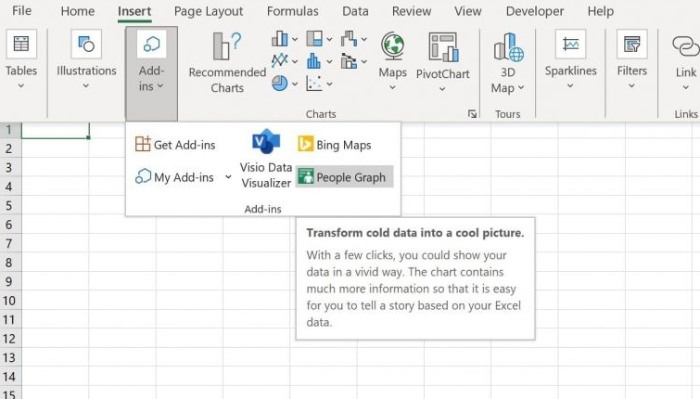
  • Open the “Add-ins” dropdown menu and select “People Graph.” Note that the terms “graph” and “chart” have slight differences, but for this tutorial, we’ll refer to it as a chart.
  • This will open the Microsoft Store, where you can download and install the People Graph add-in.people chart 1

Prepare the data:

  • To populate the people chart, you’ll need some data.
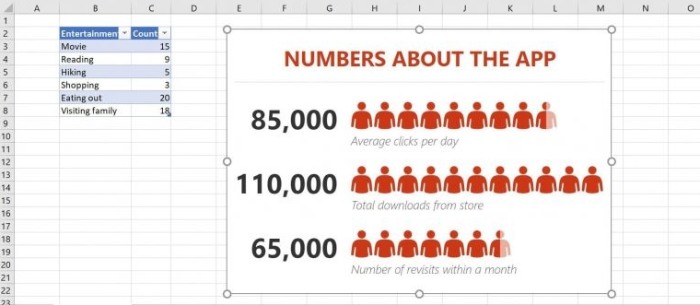
  • Create a simple dataset similar to the one shown in Figure B of the tutorial.people chart 2
  • Trust the add-in by clicking the “Trust This Add-in” button, which will generate a dummy chart with sample data.

Connect the chart to real data:

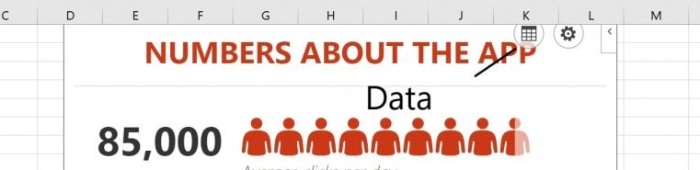
  • Click on the dummy chart and then click the “Data” icon located in the toolbar.people chart 3
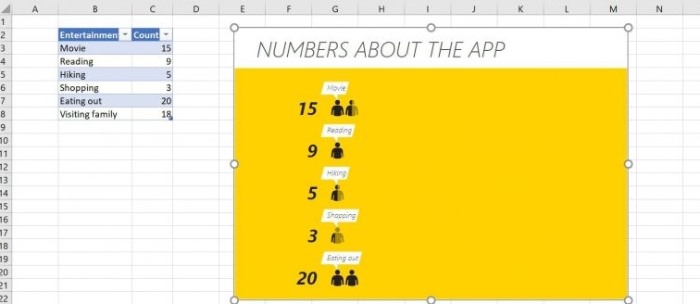
  • In the settings pane, click “Select Your Data” and choose the appropriate data range, such as the entertainment survey table shown in Figure B.
  • Click “Create” to connect the chart to your data. Note that the dummy chart must be on the same sheet as the data set.people chart 4

Customize the people chart:

  • By default, the chart has a preset design, but you can customize it to your liking.
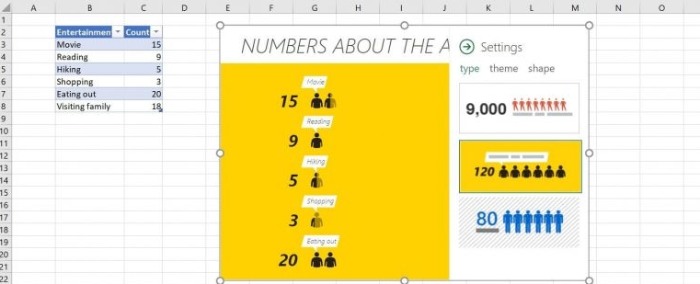
  • Click on the settings icon (gear icon) in the toolbar and choose “Type” to select from the three defined chart types.people chart 5
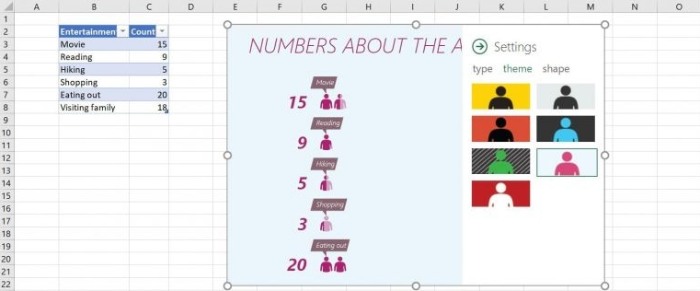
  • Next, choose a theme from the seven available options to change the appearance of the chart.
  • Additionally, you can change the shape of the people icons by selecting one of the 16 available options.people chart 6
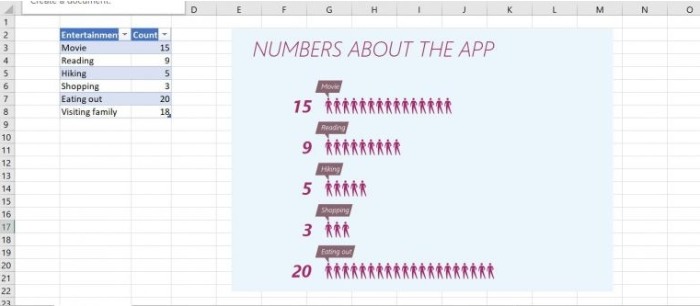
  • Close the settings pane to see the final customized chart.people chart 7

It’s worth noting that if you use a table object to store the source data, the people chart will automatically update whenever you modify the data. People charts can be a visually appealing addition to dashboards, bringing a dynamic and interesting element to your data presentation.

Creating a people chart in Excel is a quick and easy way to transform your data into an engaging visual representation that can effectively communicate information with just a glance.


Rate this post
42
306 Views
How to Enforce a Consistent Phone Number Format in Microsoft ExcelPrevHow to Enforce a Consistent Phone Number Format in Microsoft ExcelMay 25, 2023
How to print Excel sheets in black and white easilyMay 25, 2023How to print Excel sheets in black and white easilyNext

Leave a Reply Cancel reply

You must be logged in to post a comment.

Buy Windows 11 Professional MS Products CD Key
Buy Office 2021 Professional Plus Key Global For 5 PC
Top rated products
  • Windows 11 Pro Product Activation Key Windows 11 Pro Product Activation Key
    Rated 5.00 out of 5
    $6.00
  • AVG Internet Security 2021 10 Devices 1 Year Global AVG Internet Security 2021 10 Devices 1 Year Global
    Rated 5.00 out of 5
    $30.00
  • Kaspersky Total Security 2021 1 year 1 device key Global Kaspersky Total Security 2021 1 year 1 device key Global
    Rated 5.00 out of 5
    $27.00
  • Avast Ultimate Suite 2021 2 Years 10 Devices Global Avast Ultimate Suite 2021 2 Years 10 Devices Global
    Rated 5.00 out of 5
    $77.00
  • Buy Windows 11 Pro CD Key License Buy Windows 11 Pro CD Key License
    Rated 5.00 out of 5
    $6.00
Products
  • Windows Server 2012 Remote Desktop Services 50 USER Connections Key Global Windows Server 2012 Remote Desktop Services 50 USER Connections Key Global
    Rated 4.69 out of 5
    $25.00
  • AVG Ultimate 2021 with Antivirus + Cleaner, Secure VPN 10 Devices 2 Years AVG Ultimate 2021 with Antivirus + Cleaner, Secure VPN 10 Devices 2 Years
    Rated 5.00 out of 5
    $47.00
  • Buy Windows 11 Home CD Key Global Buy Windows 11 Home CD Key Global
    Rated 4.73 out of 5
    $6.00
  • Windows 11 Pro Key Global Windows 11 Pro Key Global
    Rated 5.00 out of 5
    $6.00
  • Microsoft Visio 2016 professional CD Key Global Microsoft Visio 2016 professional CD Key Global
    Rated 4.94 out of 5
    $28.50
  • Microsoft Project 2016 professional CD Key Global Microsoft Project 2016 professional CD Key Global
    Rated 4.97 out of 5
    $9.00
  • Windows 10 Pro N Key Global Windows 10 Pro N Key Global
    Rated 4.83 out of 5
    $10.00
  • Microsoft Visio Standard 2019 Key 1PC Microsoft Visio Standard 2019 Key 1PC $12.00
  • Kaspersky Plus - 1 Device 1 Year - GLOBAL Kaspersky Plus - 1 Device 1 Year - GLOBAL $23.00
  • Windows 10 Pro OEM Key Global - Reinstalling win is still active Windows 10 Pro OEM Key Global - Reinstalling win is still active
    Rated 4.88 out of 5
    $6.00
Product categories
  • Anti Virus
  • Microsoft Office
  • Microsoft Project
  • Microsoft Visio
  • Microsoft Visual
  • Microsoft Windows
  • Other Software
  • Uncategorized

Buffcom.net always brings the best digital products and services to you. Specializing in Office Software and online marketing services

BIG SALE 50% IN MAY

Microsoft Office
Microsoft Windows
Anti-Virus
Contact Us

Visit Us:

125 Division St, New York, NY 10002, USA

Mail Us:

buffcom.net@gmail.com

TERMS & CONDITIONS | PAYMENT GUIDE  | SHIPPING POLICY  | REFUND POLICY

Copyright © 2019 buffcom.net  All Rights Reserved.