• Microsoft Office
  • Microsoft Windows
  • Other Software
    • Microsoft Visual
    • Microsoft Project
    • Microsoft Visio
    • Anti Virus
  • Blog
    • Word
    • Excel
    • Powerpoint
    • Software tricks/tips

No products in the cart.

  • Microsoft Office
  • Microsoft Windows
  • Other Software
    • Microsoft Visual
    • Microsoft Project
    • Microsoft Visio
    • Anti Virus
  • Blog
    • Word
    • Excel
    • Powerpoint
    • Software tricks/tips

No products in the cart.

  • Microsoft Office
  • Microsoft Windows
  • Other Software
    • Microsoft Visual
    • Microsoft Project
    • Microsoft Visio
    • Anti Virus
  • Blog
    • Word
    • Excel
    • Powerpoint
    • Software tricks/tips

No products in the cart.

  • Microsoft Office
  • Microsoft Windows
  • Other Software
    • Microsoft Visual
    • Microsoft Project
    • Microsoft Visio
    • Anti Virus
  • Blog
    • Word
    • Excel
    • Powerpoint
    • Software tricks/tips
Excel

Retrieve Data Using Data Validation
0 Comments

Retrieve Data Using Data Validation. I’m currently working on creating a comprehensive curriculum inventory master list that encompasses several classes and corresponding quarterly reporting pages. The project consists of a total of 5 sheets: Master, Quarter 1, Quarter 2, Quarter 3, and Quarter 4, each featuring four classes.

Retrieve Data Using Data Validation

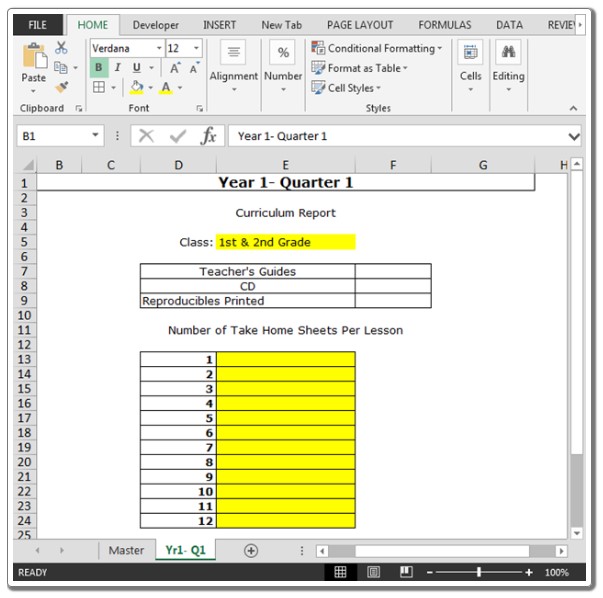
The primary goal on each Quarterly reporting page is to select the correct class (already facilitated with data validation) and have the relevant data from the Master List populate accordingly. For example, if I choose “Pre K & Kindergarten,” a specific set of data should be retrieved, and if I select “1st and 2nd Grade,” the corresponding numbers should adjust accordingly.

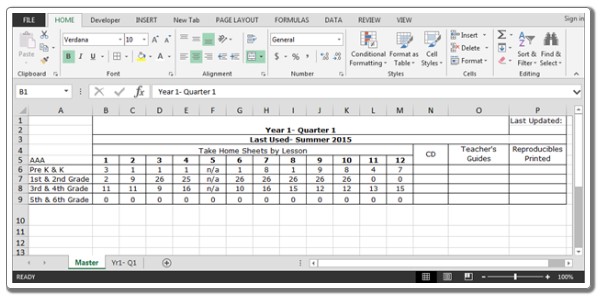
Please find a sample file attached. The first page represents the master list, and the second page is the reporting page. The highlighted section is where data validation is applied, and the red area is where I would like the relevant numbers to appear.
Retrieve Data Using Data Validation

Retrieve Data Using Data Validation

Master Sheet:

Yr1- Q1 Sheet:
Retrieve Data Using Data Validation

Retrieve Data Using Data Validation

To achieve this, we employ the “INDEX” and “MATCH” functions. The “INDEX” function is used for value lookup, while the “MATCH” function is utilized to identify dimensions (row and column).

Follow the steps below:

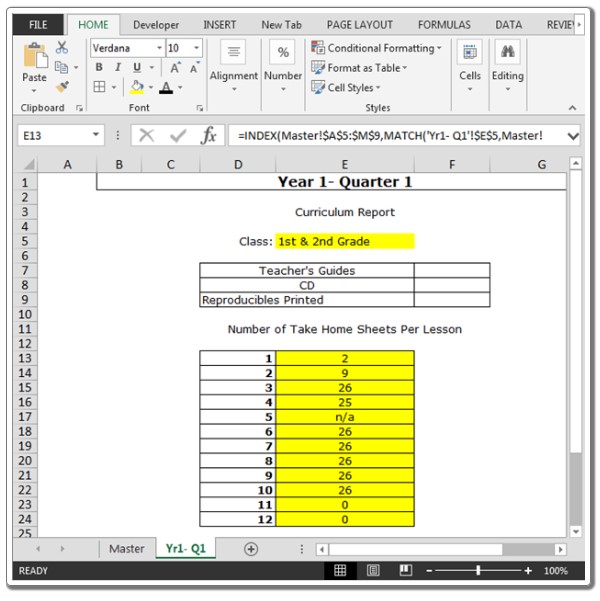
Input the formula in cell E13:
=INDEX(Master!$A$5:$M$9,MATCH(‘Yr1- Q1’!$E$5,Master!$A$5:$A$9,0),MATCH(‘Yr1- Q1’!$D13,Master!$A$5:$M$5,0))
Copy the same formula into the range E14:E24.
Retrieve Data Using Data Validation

Retrieve Data Using Data Validation

As you change the class, the numbers will automatically adjust accordingly.

Rate this post
72
336 Views
Summing Unique Positive Values in ExcelPrevSumming Unique Positive Values in ExcelAugust 31, 2023
How to Convert Text Dates to Dates in Excel?September 5, 2023How to Convert Text Dates to Dates in Excel?Next

Leave a Reply Cancel reply

You must be logged in to post a comment.

Buy Windows 11 Professional MS Products CD Key
Buy Office 2021 Professional Plus Key Global For 5 PC
Top rated products
  • Buy Office 2021 Professional Plus Key Global For 5 PC Buy Office 2021 Professional Plus Key Global For 5 PC
    Rated 5.00 out of 5
    $68.00
  • AVG Internet Security 2021 1 Device 1 Year Global AVG Internet Security 2021 1 Device 1 Year Global
    Rated 5.00 out of 5
    $11.00
  • Avast SecureLine VPN 2021 2 Years 5 Devices Global Avast SecureLine VPN 2021 2 Years 5 Devices Global
    Rated 5.00 out of 5
    $47.00
  • Windows 11 Pro Product Activation Key Windows 11 Pro Product Activation Key
    Rated 5.00 out of 5
    $6.00
  • AVG Internet Security 2021 10 Devices 1 Year Global AVG Internet Security 2021 10 Devices 1 Year Global
    Rated 5.00 out of 5
    $30.00
Products
  • Project Professional 2024 Project Professional 2024 $43.00
  • Windows 10 Pro N Key Global Windows 10 Pro N Key Global
    Rated 4.83 out of 5
    $10.00
  • Kaspersky Internet Security 2021 1 year 1 device key Global Kaspersky Internet Security 2021 1 year 1 device key Global
    Rated 5.00 out of 5
    $24.00
  • Kaspersky Total Security 2021 1 year 5 devices key Global Kaspersky Total Security 2021 1 year 5 devices key Global
    Rated 5.00 out of 5
    $46.00
  • Windows Server 2022 Remote Desktop Services User Connections (50) Cal Key Global Windows Server 2022 Remote Desktop Services User Connections (50) Cal Key Global
    Rated 5.00 out of 5
    $22.00
  • Microsoft Office Professional Plus 2013 retail CD Key Global Microsoft Office Professional Plus 2013 retail CD Key Global
    Rated 4.97 out of 5
    $11.00
  • Microsoft Visio 2019 Professional Key Global Microsoft Visio 2019 Professional Key Global - 5 PC
    Rated 4.93 out of 5
    $19.00
  • Windows 10 Enterprise LTSC 2019 Key Global Windows 10 Enterprise LTSC 2019 Key Global
    Rated 4.83 out of 5
    $9.00
  • AVG Internet Security 2021 10 Devices 2 Years Global AVG Internet Security 2021 10 Devices 2 Years Global
    Rated 5.00 out of 5
    $42.20
  • Windows Server 2016 Datacenter Key Global Windows Server 2016 Datacenter Key Global
    Rated 4.74 out of 5
    $10.00
Product categories
  • Anti Virus
  • Microsoft Office
  • Microsoft Project
  • Microsoft Visio
  • Microsoft Visual
  • Microsoft Windows
  • Other Software
  • Uncategorized

Buffcom.net always brings the best digital products and services to you. Specializing in Office Software and online marketing services

BIG SALE 50% IN MAY

Microsoft Office
Microsoft Windows
Anti-Virus
Contact Us

Visit Us:

125 Division St, New York, NY 10002, USA

Mail Us:

buffcom.net@gmail.com

TERMS & CONDITIONS | PAYMENT GUIDE  | SHIPPING POLICY  | REFUND POLICY

Copyright © 2019 buffcom.net  All Rights Reserved.