
• Microsoft Office
  • Microsoft Windows
  • Other Software
    • Microsoft Visual
    • Microsoft Project
    • Microsoft Visio
    • Anti Virus
  • Blog
    • Word
    • Excel
    • Powerpoint
    • Software tricks/tips

No products in the cart.

  • Microsoft Office
  • Microsoft Windows
  • Other Software
    • Microsoft Visual
    • Microsoft Project
    • Microsoft Visio
    • Anti Virus
  • Blog
    • Word
    • Excel
    • Powerpoint
    • Software tricks/tips

No products in the cart.

  • Microsoft Office
  • Microsoft Windows
  • Other Software
    • Microsoft Visual
    • Microsoft Project
    • Microsoft Visio
    • Anti Virus
  • Blog
    • Word
    • Excel
    • Powerpoint
    • Software tricks/tips

No products in the cart.

  • Microsoft Office
  • Microsoft Windows
  • Other Software
    • Microsoft Visual
    • Microsoft Project
    • Microsoft Visio
    • Anti Virus
  • Blog
    • Word
    • Excel
    • Powerpoint
    • Software tricks/tips
Excel

How to fix the issue of unable to edit an Excel file
0 Comments

How to fix the issue of unable to edit an Excel file: During work, there are instances where you receive an Excel file from someone else, but you’re unable to edit the data. The following article will guide you on how to resolve this problem.

1. Unable to edit due to the Protect View feature being enabled

Step 1: Go to File => Select Options.
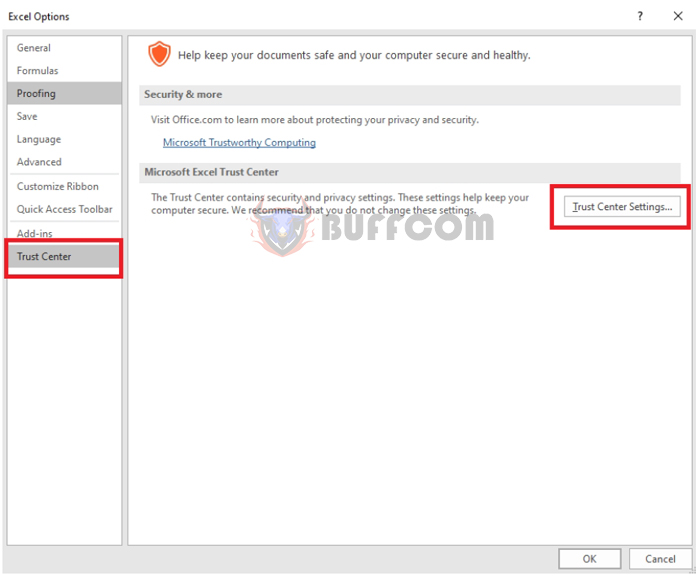
Step 2: In the Options window, choose Trust Center => Trust Center Settings.
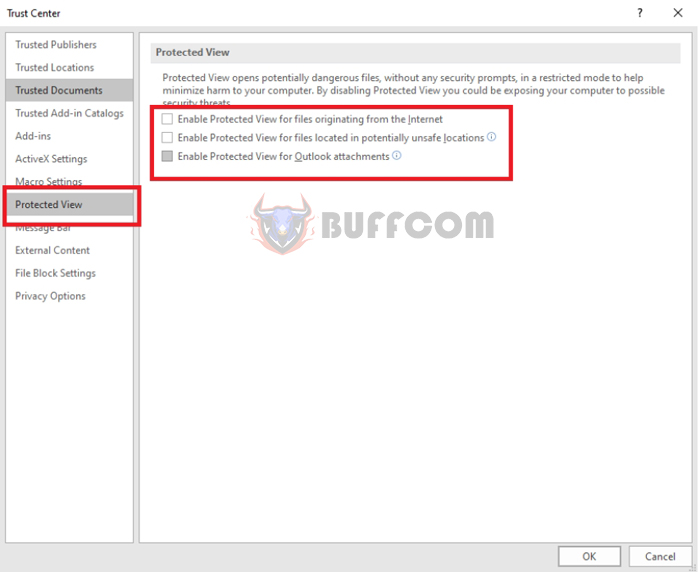
How to fix the issue of unable to edit an Excel file2Step 3: The Trust Center window appears => select Protected View => uncheck all 3 boxes => OK.
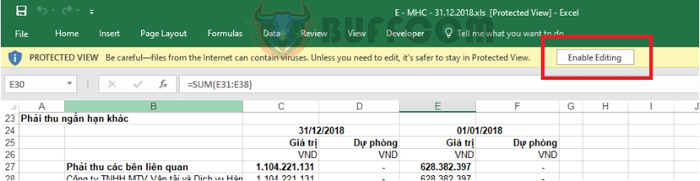
How to fix the issue of unable to edit an Excel file3Step 4: Return to the Excel file, click on the Enable Editing button, and your file will be editable.
How to fix the issue of unable to edit an Excel file42. Unable to edit due to the file being set as “Read-Only”

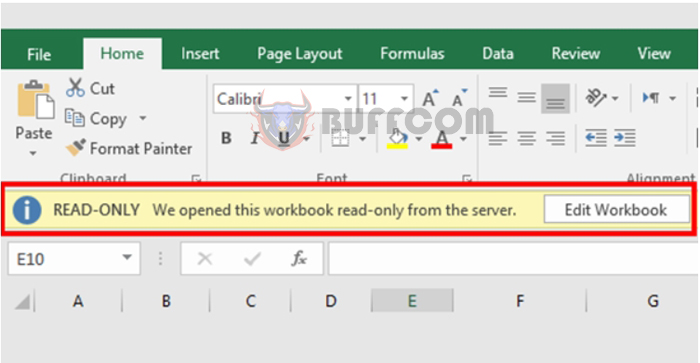
For some Excel files, even after disabling the Protected View feature, you still can’t edit them. The file name is accompanied by the term “Read-Only.” In this case, the file has been set to read-only mode, preventing any modifications. To edit the file, you need to disable the Read-Only mode.

How to fix the issue of unable to edit an Excel file5
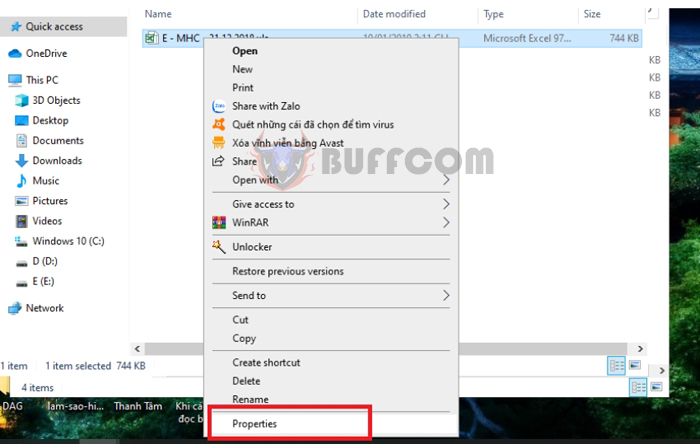
Step 1: Right-click on the file that needs to be disabled from Read-Only mode => select Properties.
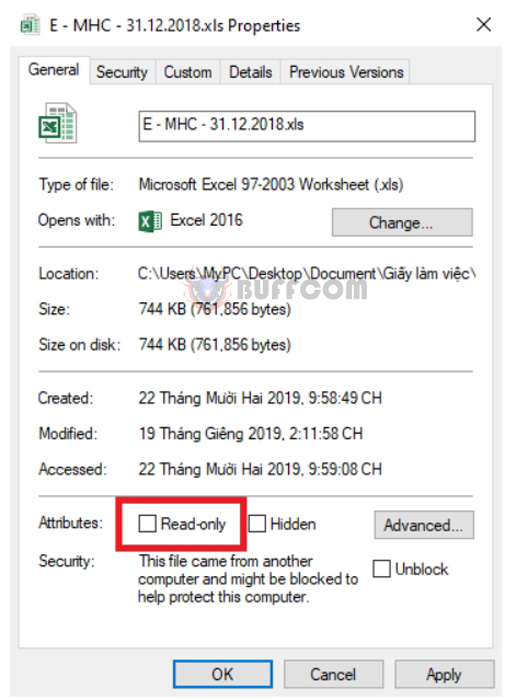
How to fix the issue of unable to edit an Excel file6Step 2: The Properties window appears, uncheck the Read-only box => OK. This disables the Read-Only mode, allowing you to edit the file normally.
How to fix the issue of unable to edit an Excel file73. Create a different copy using Save As

If you have tried both methods above and still can’t edit the file, you should create a different copy using the Save As feature.
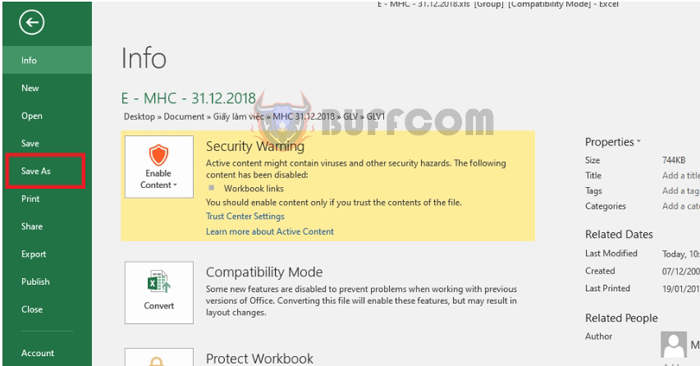
Step 1: Open the locked editing file, go to File => select Save As.
How to fix the issue of unable to edit an Excel file

How to fix the issue of unable to edit an Excel file

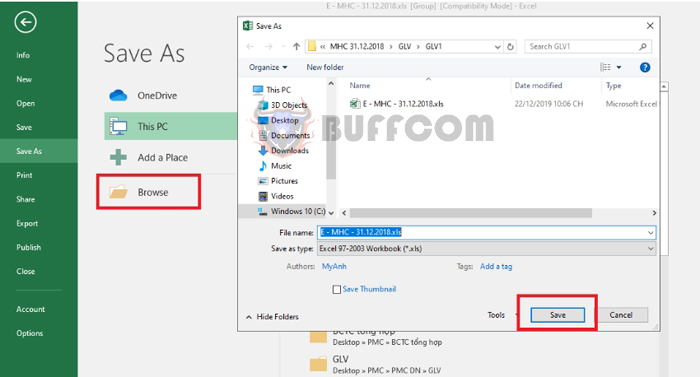
Step 2: Then choose Browse => Specify a name and storage location for the new file => select Save => Open the newly created file and edit it as usual.
How to fix the issue of unable to edit an Excel file9This article has provided you with methods to overcome the issue of being unable to edit your Excel file. Wishing you success!

Rate this post
58
333 Views
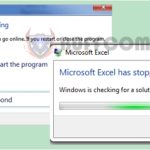
How to handle Excel file errors such as Not Responding, freezing, and hangingPrevHow to handle Excel file errors such as Not Responding, freezing, and hangingMay 29, 2023
How to burn your PowerPoint to a DVD discMay 29, 2023How to burn your PowerPoint to a DVD discNext

Leave a Reply Cancel reply

You must be logged in to post a comment.

Buy Windows 11 Professional MS Products CD Key
Buy Office 2021 Professional Plus Key Global For 5 PC
Top rated products
  • Windows 11 Pro Product Activation Key Windows 11 Pro Product Activation Key
    Rated 5.00 out of 5
    $6.00
  • AVG Internet Security 2021 10 Devices 1 Year Global AVG Internet Security 2021 10 Devices 1 Year Global
    Rated 5.00 out of 5
    $30.00
  • Kaspersky Total Security 2021 1 year 1 device key Global Kaspersky Total Security 2021 1 year 1 device key Global
    Rated 5.00 out of 5
    $27.00
  • Avast Ultimate Suite 2021 2 Years 10 Devices Global Avast Ultimate Suite 2021 2 Years 10 Devices Global
    Rated 5.00 out of 5
    $77.00
  • Buy Windows 11 Pro CD Key License Buy Windows 11 Pro CD Key License
    Rated 5.00 out of 5
    $6.00
Products
  • Kaspersky Total Security 2021 1 year 1 device key Global Kaspersky Total Security 2021 1 year 1 device key Global
    Rated 5.00 out of 5
    $27.00
  • SQL Server 2019 Standard SQL Server 2019 Standard $20.00
  • AVG Ultimate 2021 with Antivirus + Cleaner, Secure VPN 10 Devices 1 Year AVG Ultimate 2021 with Antivirus + Cleaner, Secure VPN 10 Devices 1 Year
    Rated 4.91 out of 5
    $34.00
  • Microsoft Visio Standard 2021 Key 1PC Microsoft Visio Standard 2021 Key 1PC $13.00
  • Avast SecureLine VPN 2021 2 Years 5 Devices Global Avast SecureLine VPN 2021 2 Years 5 Devices Global
    Rated 5.00 out of 5
    $47.00
  • Windows Server 2022 Remote Desktop Services Device Connections (50) Cal Key Global Windows Server 2022 Remote Desktop Services Device Connections (50) Cal Key Global
    Rated 5.00 out of 5
    $22.00
  • Windows 10 Home OEM Key Global Windows 10 Home OEM Key Global
    Rated 4.80 out of 5
    $6.00
  • Microsoft Visual Studio Enterprise 2019 For 1 PC Microsoft Visual Studio Enterprise 2019 For 1 PC
    Rated 4.88 out of 5
    $15.00
  • Microsoft Visual Studio Enterprise 2022 For 1 PC Microsoft Visual Studio Enterprise 2022 For 1 PC $19.00
  • Microsoft Office Home And Business 2016 For Mac Key Global Bind Microsoft Account Microsoft Office Home And Business 2016 For Mac Key Global Bind Microsoft Account
    Rated 4.92 out of 5
    $15.00
Product categories
  • Anti Virus
  • Microsoft Office
  • Microsoft Project
  • Microsoft Visio
  • Microsoft Visual
  • Microsoft Windows
  • Other Software
  • Uncategorized

Buffcom.net always brings the best digital products and services to you. Specializing in Office Software and online marketing services

BIG SALE 50% IN MAY

Microsoft Office
Microsoft Windows
Anti-Virus
Contact Us

Visit Us:

125 Division St, New York, NY 10002, USA

Mail Us:

buffcom.net@gmail.com

TERMS & CONDITIONS | PAYMENT GUIDE  | SHIPPING POLICY  | REFUND POLICY

Copyright © 2019 buffcom.net  All Rights Reserved.