
• Microsoft Office
  • Microsoft Windows
  • Other Software
    • Microsoft Visual
    • Microsoft Project
    • Microsoft Visio
    • Anti Virus
  • Blog
    • Word
    • Excel
    • Powerpoint
    • Software tricks/tips

No products in the cart.

  • Microsoft Office
  • Microsoft Windows
  • Other Software
    • Microsoft Visual
    • Microsoft Project
    • Microsoft Visio
    • Anti Virus
  • Blog
    • Word
    • Excel
    • Powerpoint
    • Software tricks/tips

No products in the cart.

  • Microsoft Office
  • Microsoft Windows
  • Other Software
    • Microsoft Visual
    • Microsoft Project
    • Microsoft Visio
    • Anti Virus
  • Blog
    • Word
    • Excel
    • Powerpoint
    • Software tricks/tips

No products in the cart.

  • Microsoft Office
  • Microsoft Windows
  • Other Software
    • Microsoft Visual
    • Microsoft Project
    • Microsoft Visio
    • Anti Virus
  • Blog
    • Word
    • Excel
    • Powerpoint
    • Software tricks/tips
Excel

2 Ways to Copy Values in Excel
0 Comments

2 Ways to Copy Values in Excel: Excel provides a wide range of functions to enable users to calculate quickly and accurately. However, using functions and formulas can sometimes make it difficult for users to copy values in Excel. Copying is a basic operation that everyone needs to be proficient in when using Excel. This article will share some ways to copy values in Excel using shortcuts and regular operations. Let’s follow along.

1. Regular Copy in Excel

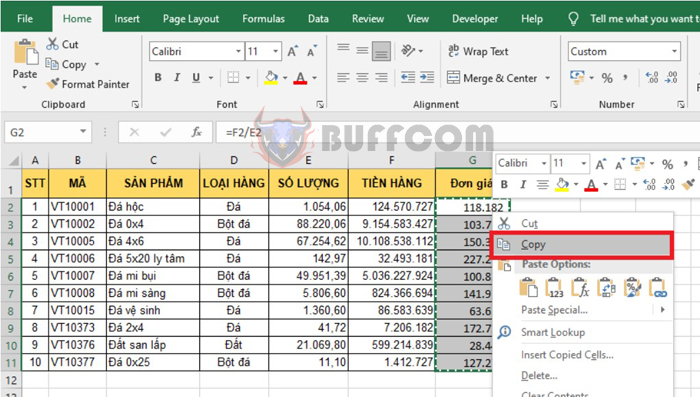
For example, we have a data table as shown below. You can see that the Price column is a function that represents the result of Revenue/Quantity. Usually, if you want to copy the data of the Price column, you would select the data in that column, right-click and choose Copy. Or you can use the shortcut key combination Ctrl + C to copy the data.

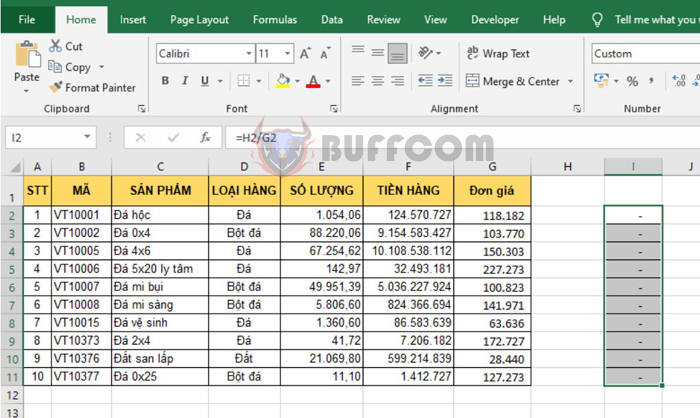
Next, right-click on the position where you want to paste the data and choose Paste. Or you can use the shortcut key combination Ctrl + V to paste the data. However, copying like this will also copy the calculation formula in the Price column to the new column. Therefore, the formula in the new column will also change the corresponding reference position, and the value will not be the same as before. To copy the value, follow the method below.
2 Ways to Copy Values in Excel

2 Ways to Copy Values in Excel


2. Copying Values in Excel

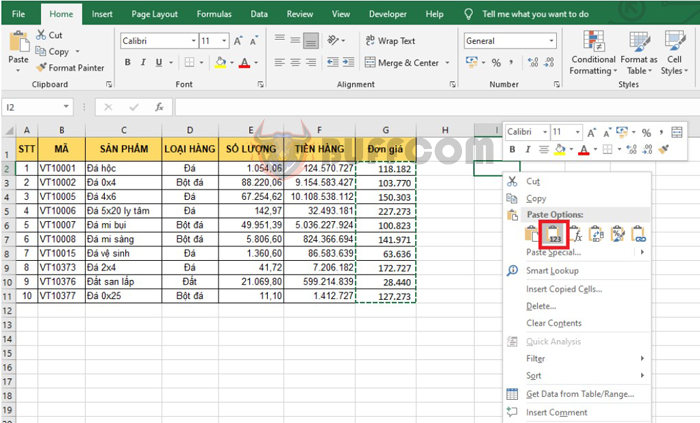
At this point, the Paste Value feature will help you solve the problem above. First, you need to select the entire Price column and then press Ctrl + C to copy the data. Then, right-click on the new position and choose Paste Value to paste the value of the data.
2 Ways to Copy Values in Excel

2 Ways to Copy Values in Excel

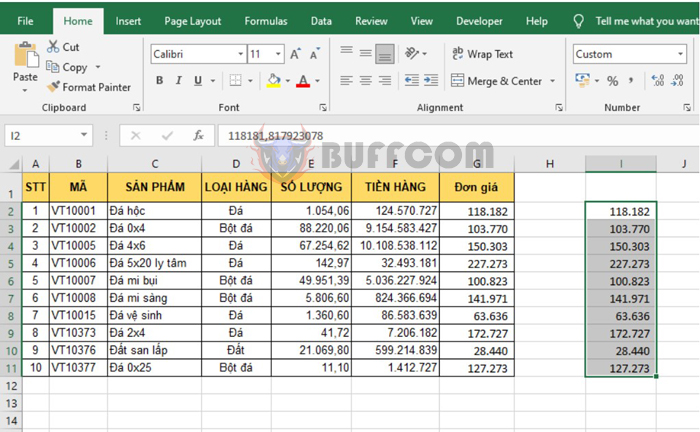
The result will be a new data set that has been converted into a value, not a function calculation.
2 Ways to Copy Values in Excel

2 Ways to Copy Values in Excel

Alternatively, you can right-click and choose Paste Special.
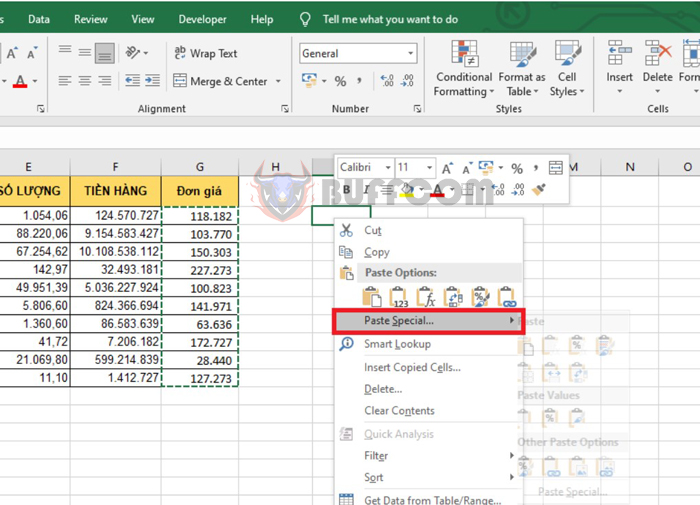
2 Ways to Copy Values in Excel

2 Ways to Copy Values in Excel

At this point, the Paste Special dialog box appears. Select Values, then click OK to complete. This way, the new data has been converted to a value, not a calculation formula.
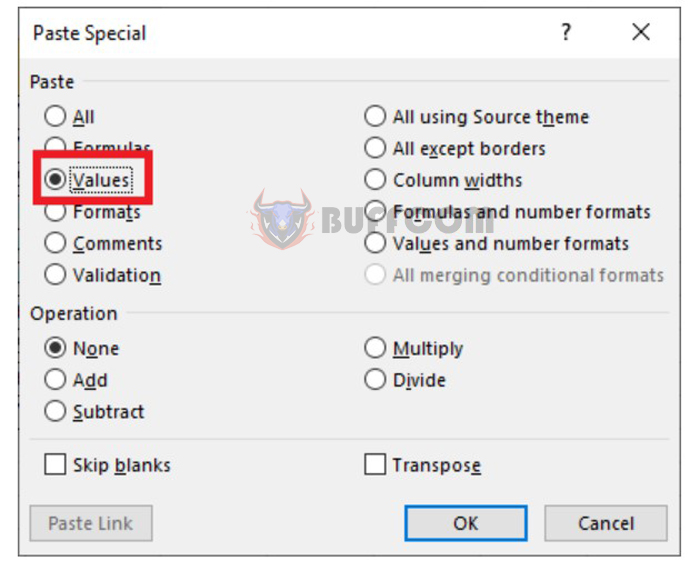
2 Ways to Copy Values in Excel

2 Ways to Copy Values in Excel

In this article, we have learned about how to copy values in Excel. Copying values is one of the basic and important tasks when using Excel, but it can be difficult at times. Excel provides many functions to help users calculate quickly and accurately, but using these functions and formulas can sometimes make it challenging to copy values. We have shared some methods for copying values in Excel using shortcut keys and conventional techniques. By following these methods, users can easily copy values in Excel and avoid any unintentional changes to their formulas or calculations.

Rate this post
49
338 Views
How To Calculate Sum In Word You Might Not KnowPrevHow To Calculate Sum In Word You Might Not KnowMarch 15, 2023
2 Ways to Print a Selected Range of Data in ExcelMarch 16, 20232 Ways to Print a Selected Range of Data in ExcelNext

Leave a Reply Cancel reply

You must be logged in to post a comment.

Buy Windows 11 Professional MS Products CD Key
Buy Office 2021 Professional Plus Key Global For 5 PC
Top rated products
  • Windows 11 Home Key Global 2021 Windows 11 Home Key Global 2021
    Rated 5.00 out of 5
    $6.00
  • Windows Server 2022 Remote Desktop Services User Connections (50) Cal Key Global Windows Server 2022 Remote Desktop Services User Connections (50) Cal Key Global
    Rated 5.00 out of 5
    $22.00
  • AVG Ultimate 2021 with Antivirus + Cleaner, Secure VPN 10 Devices 2 Years AVG Ultimate 2021 with Antivirus + Cleaner, Secure VPN 10 Devices 2 Years
    Rated 5.00 out of 5
    $47.00
  • Avast Premium Security 2021 10 Devices 1 Year Global Avast Premium Security 2021 10 Devices 1 Year Global
    Rated 5.00 out of 5
    $28.00
  • Avast Ultimate Suite 2021 3 Years 10 Devices Global Avast Ultimate Suite 2021 3 Years 10 Devices Global
    Rated 5.00 out of 5
    $90.00
Products
  • Microsoft Visio Professional 2010 Key 1PC Microsoft Visio Professional 2010 Key 1PC $9.00
  • Project Professional 2010 Microsoft Project Professional 2010 - 1PC $9.00
  • Windows 11 Pro Key Global Windows 11 Pro Key Global
    Rated 5.00 out of 5
    $6.00
  • Windows Server 2019 Standard Key Global Windows Server 2019 Standard Key Global
    Rated 4.68 out of 5
    $7.00
  • Kaspersky Standard - 1 Device, 1 Year (Global License) Kaspersky Standard - 1 Device, 1 Year (Global License) $21.00
  • Avast SecureLine VPN 2021 2 Years 5 Devices Global Avast SecureLine VPN 2021 2 Years 5 Devices Global
    Rated 5.00 out of 5
    $47.00
  • Windows Server 2022 Remote Desktop Services User Connections (50) Cal Key Global Windows Server 2022 Remote Desktop Services User Connections (50) Cal Key Global
    Rated 5.00 out of 5
    $22.00
  • Buy Windows Server 2016 Essentials Key Global Buy Windows Server 2016 Essentials Key Global
    Rated 4.75 out of 5
    $10.00
  • Microsoft Project 2016 professional CD Key Global Microsoft Project 2016 professional CD Key Global
    Rated 4.97 out of 5
    $9.00
  • Windows Server 2016 Remote Desktop Services 50 USER Connections Key Global Windows Server 2016 Remote Desktop Services 50 USER Connections Key Global
    Rated 4.74 out of 5
    $15.00
Product categories
  • Anti Virus
  • Microsoft Office
  • Microsoft Project
  • Microsoft Visio
  • Microsoft Visual
  • Microsoft Windows
  • Other Software
  • Uncategorized

Buffcom.net always brings the best digital products and services to you. Specializing in Office Software and online marketing services

BIG SALE 50% IN MAY

Microsoft Office
Microsoft Windows
Anti-Virus
Contact Us

Visit Us:

125 Division St, New York, NY 10002, USA

Mail Us:

buffcom.net@gmail.com

TERMS & CONDITIONS | PAYMENT GUIDE  | SHIPPING POLICY  | REFUND POLICY

Copyright © 2019 buffcom.net  All Rights Reserved.