• Microsoft Office
  • Microsoft Windows
  • Other Software
    • Microsoft Visual
    • Microsoft Project
    • Microsoft Visio
    • Anti Virus
  • Blog
    • Word
    • Excel
    • Powerpoint
    • Software tricks/tips

No products in the cart.

  • Microsoft Office
  • Microsoft Windows
  • Other Software
    • Microsoft Visual
    • Microsoft Project
    • Microsoft Visio
    • Anti Virus
  • Blog
    • Word
    • Excel
    • Powerpoint
    • Software tricks/tips

No products in the cart.

  • Microsoft Office
  • Microsoft Windows
  • Other Software
    • Microsoft Visual
    • Microsoft Project
    • Microsoft Visio
    • Anti Virus
  • Blog
    • Word
    • Excel
    • Powerpoint
    • Software tricks/tips

No products in the cart.

  • Microsoft Office
  • Microsoft Windows
  • Other Software
    • Microsoft Visual
    • Microsoft Project
    • Microsoft Visio
    • Anti Virus
  • Blog
    • Word
    • Excel
    • Powerpoint
    • Software tricks/tips
Word

How to replace underline with italic in word?
0 Comments

Here are two methods to replace all underline characters with italic in Word:

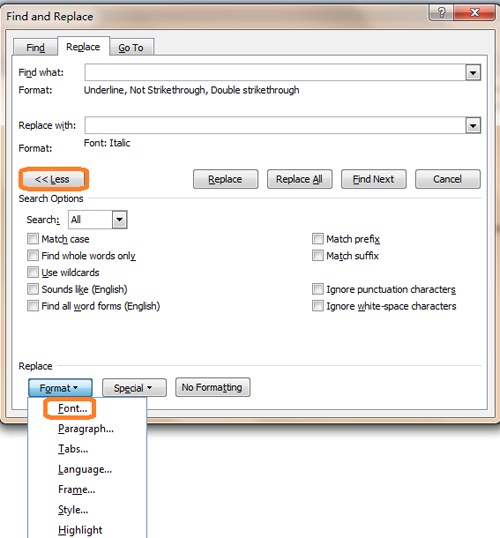
Replace all underline characters with italic using Find and Replace:

  1. Click on the “Home” tab, then click on “Replace” in the Editing group, or press Ctrl + H to open the Find and Replace dialog box.
  2. Click “More” to show additional options.
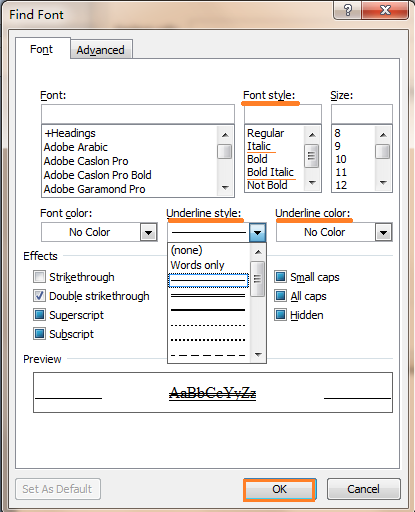
  3. In the “Find what” box, click on “Format” and choose “Font”. Then, select “Underline” in the Font dialog box.How to replace underline with italic in word
  4. In the “Replace with” box, click on “Format” and choose “Font”. Then, select “Italic” in the Font dialog box.
  5. Click “OK” to close the Font dialog box, then click “Replace All” to replace all instances of underline with italic.
    How to replace underline with italic in word

    How to replace underline with italic in word

Replace all underline characters with italic using VBA:

  1. Press Alt + F11 to open the Visual Basic for Applications (VBA) editor.
  2. Click on “Insert” in the menu, then click on “Module” to insert a new module.
  3. Copy and paste the following VBA code into the module window:
Sub ReplaceUnderlineWithItalic()
Selection.Find.ClearFormatting
Selection.Find.Font.Underline = wdUnderlineSingle
Selection.Find.Replacement.ClearFormatting
Selection.Find.Replacement.Font.Italic = True
With Selection.Find
.Text = “”
.Replacement.Text = “”
.Forward = True
.Wrap = wdFindContinue
.Format = True
.MatchCase = False
.MatchWholeWord = False
.MatchWildcards = False
.MatchSoundsLike = False
.MatchAllWordForms = False
End With

Selection.Find.Execute Replace:=wdReplaceAll
End Sub

  1. Press F5 or click on “Run” to execute the macro.

These methods will replace all underline characters with italic in your Word document.
4.3/5 - (3 votes)
45
202 Views
How to merge multiple documents and keep format in word?PrevHow to merge multiple documents and keep format in word?April 22, 2024
How to find or open Startup folder location in word?April 24, 2024How to find or open Startup folder location in word?Next
Buy Windows 11 Professional MS Products CD Key
Buy Office 2021 Professional Plus Key Global For 5 PC
Top rated products
  • Kaspersky Total Security 2021 1 year 5 devices key Global Kaspersky Total Security 2021 1 year 5 devices key Global
    Rated 5.00 out of 5
    $46.00
  • Avast Premium Security 2021 Avast Premium Security 2021 1 Device 1 Year Global
    Rated 5.00 out of 5
    $11.00
  • Trend Micro Internet Security 3 Devices 1 Year Key GLOBAL Trend Micro Internet Security 3 Devices 1 Year Key GLOBAL
    Rated 5.00 out of 5
    $17.00
  • Windows 11 Pro Key Global Windows 11 Pro Key Global
    Rated 5.00 out of 5
    $6.00
  • AVG Internet Security 2021 10 Devices 2 Years Global AVG Internet Security 2021 10 Devices 2 Years Global
    Rated 5.00 out of 5
    $42.20
Products
  • Kaspersky Internet Security 2021 1 year 5 devices key Global Kaspersky Internet Security 2021 1 year 5 devices key Global
    Rated 5.00 out of 5
    $45.00
  • Windows Server2008 R2 Remote Desktop Services user connections (20)cal Windows Server2008 R2 Remote Desktop Services user connections (20)cal $29.00
  • Windows Server 2025 Remote Desktop Services 50 Device Connections Windows Server 2025 Remote Desktop Services 50 Device Connections $25.00
  • Microsoft Visio Professional 2013 Key 1PC Microsoft Visio Professional 2013 Key 1PC $9.00
  • Avast Ultimate Suite 2021 3 Years 10 Devices Global Avast Ultimate Suite 2021 3 Years 10 Devices Global
    Rated 5.00 out of 5
    $90.00
  • Avast SecureLine VPN 2021 2 Years 5 Devices Global Avast SecureLine VPN 2021 2 Years 5 Devices Global
    Rated 5.00 out of 5
    $47.00
  • Buy Office 2021 Professional Plus Key Global For 5 PC Buy Office 2021 Professional Plus Key Global For 5 PC
    Rated 5.00 out of 5
    $68.00
  • Kaspersky Standard - 1 Device, 1 Year (Global License) Kaspersky Standard - 1 Device, 1 Year (Global License) $21.00
  • Microsoft Visio 2016 professional CD Key Global Microsoft Visio 2016 professional CD Key Global
    Rated 4.94 out of 5
    $28.50
  • Microsoft Project 2019 Professional Key Global Microsoft Project 2019 Professional - 5 PC
    Rated 4.97 out of 5
    $12.00
Product categories
  • Anti Virus
  • Microsoft Office
  • Microsoft Project
  • Microsoft Visio
  • Microsoft Visual
  • Microsoft Windows
  • Other Software
  • Uncategorized

Buffcom.net always brings the best digital products and services to you. Specializing in Office Software and online marketing services

BIG SALE 50% IN MAY

Microsoft Office
Microsoft Windows
Anti-Virus
Contact Us

Visit Us:

125 Division St, New York, NY 10002, USA

Mail Us:

buffcom.net@gmail.com

TERMS & CONDITIONS | PAYMENT GUIDE  | SHIPPING POLICY  | REFUND POLICY

Copyright © 2019 buffcom.net  All Rights Reserved.