• Microsoft Office
  • Microsoft Windows
  • Other Software
    • Microsoft Visual
    • Microsoft Project
    • Microsoft Visio
    • Anti Virus
  • Blog
    • Word
    • Excel
    • Powerpoint
    • Software tricks/tips

No products in the cart.

  • Microsoft Office
  • Microsoft Windows
  • Other Software
    • Microsoft Visual
    • Microsoft Project
    • Microsoft Visio
    • Anti Virus
  • Blog
    • Word
    • Excel
    • Powerpoint
    • Software tricks/tips

No products in the cart.

  • Microsoft Office
  • Microsoft Windows
  • Other Software
    • Microsoft Visual
    • Microsoft Project
    • Microsoft Visio
    • Anti Virus
  • Blog
    • Word
    • Excel
    • Powerpoint
    • Software tricks/tips

No products in the cart.

  • Microsoft Office
  • Microsoft Windows
  • Other Software
    • Microsoft Visual
    • Microsoft Project
    • Microsoft Visio
    • Anti Virus
  • Blog
    • Word
    • Excel
    • Powerpoint
    • Software tricks/tips
Software tricks/tips

Optimizing Restart for Windows 10/Windows 11
0 Comments

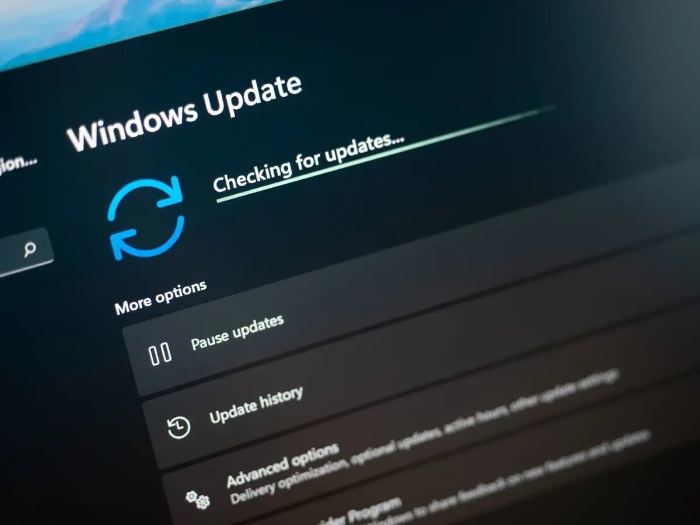
In the course of using your system, minor issues may arise, especially concerning Windows updates. To address these challenges, a simple yet effective solution is to restart your computer. Below is a detailed guide to help you perform this task.

1. Save unsaved work:

  • Before shutting down your computer, ensure you have saved all unsaved work to prevent any loss of important data.Optimizing Restart for Windows 10 Windows 112

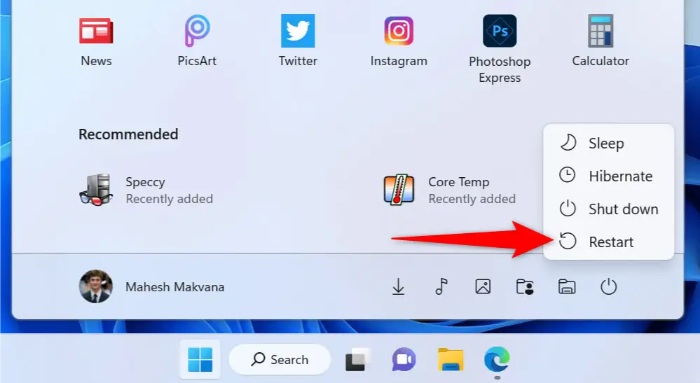
2. Restart your computer:

  • Open the Start menu by selecting the Start button or pressing the Windows key.
  • Choose the Power icon and select “Restart” to initiate the computer restart.Optimizing Restart for Windows 10 Windows 113

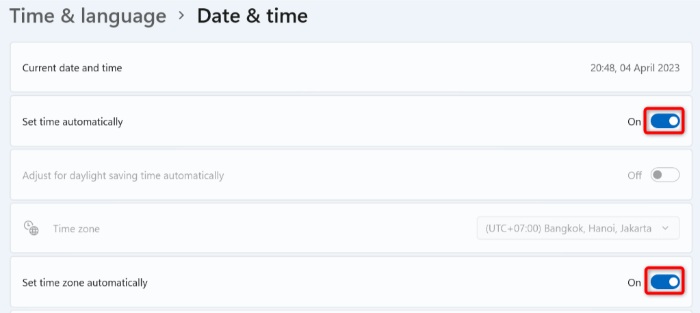
3. Ensure accurate date and time:

  • Press Windows + I to open Windows Settings.
  • Select “Time & language” on the left sidebar and “Date & time” on the right frame.
  • Enable both “Set time automatically” and “Set time zone automatically” options on the right.Optimizing Restart for Windows 10 Windows 114

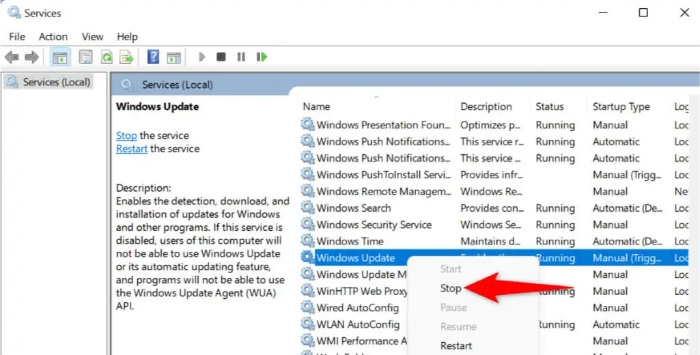
4. Clear Windows update cache:

  • Open the Run dialog by pressing Windows + R.
  • Type services.msc and press Enter.
  • Right-click on the Windows Update service and select “Stop.”Optimizing Restart for Windows 10 Windows 115
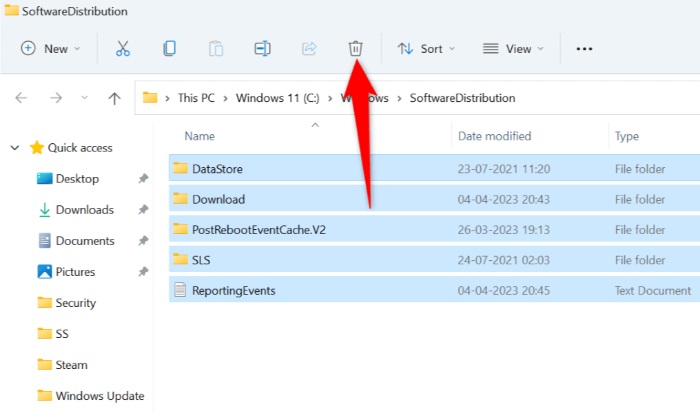
  • Reopen the Run dialog, enter C:\Windows\SoftwareDistribution, select all files, and delete them.
  • Go back to the Service window, right-click on the Windows Update service, and choose “Start.”Optimizing Restart for Windows 10 Windows 116

5. Use Windows Update Troubleshooter:

  • Right-click on the Start button and select “Settings.”
  • Choose “System” and “Troubleshoot” on the left side.
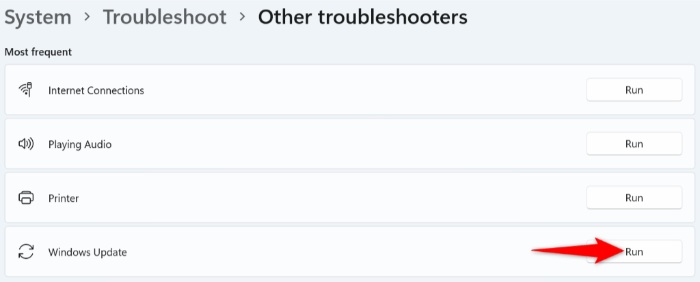
  • Select “Additional troubleshooters” and run the Windows Update troubleshooter.
    Optimizing Restart for Windows 10 Windows 11

    Optimizing Restart for Windows 10 Windows 11

6. Repair component store:

  • Open Command Prompt with administrative privileges.
  • Run the following commands:
    DISM /online /cleanup-image /scanhealth
    DISM /online /cleanup-image /checkhealth
    DISM /online /cleanup-image /restorehealth
    sfc /scannow
  • Restart your computer after completing the commands.

These steps will help you optimize the restart process and address common issues related to Windows updates.
Rate this post
43
246 Views
Key Roles and Features in Windows Server 2019 EssentialsPrevKey Roles and Features in Windows Server 2019 EssentialsDecember 16, 2023
Guide to Installing Windows 10 from a USB DriveDecember 18, 2023Guide to Installing Windows 10 from a USB DriveNext

Leave a Reply Cancel reply

You must be logged in to post a comment.

Buy Windows 11 Professional MS Products CD Key
Buy Office 2021 Professional Plus Key Global For 5 PC
Top rated products
  • Kaspersky Small Office Security 15 PCs + 15 Mobiles + 2 Servers 1 Year Kaspersky Small Office Security 15 PCs + 15 Mobiles + 2 Servers 1 Year
    Rated 5.00 out of 5
    $201.00
  • Buy Windows 11 Professional MS Products CD Key Buy Windows 11 Professional MS Products CD Key
    Rated 5.00 out of 5
    $6.00
  • AVG Internet Security 2021 1 Device 1 Year Global AVG Internet Security 2021 1 Device 1 Year Global
    Rated 5.00 out of 5
    $11.00
  • Buy Office 2021 Professional Plus Key Global For 5 PC Buy Office 2021 Professional Plus Key Global For 5 PC
    Rated 5.00 out of 5
    $68.00
  • Avast SecureLine VPN 2021 2 Years 5 Devices Global Avast SecureLine VPN 2021 2 Years 5 Devices Global
    Rated 5.00 out of 5
    $47.00
Products
  • Office 2016 Home and Student for PC Key CD Key Global Office 2016 Home and Student for PC Key CD Key Global
    Rated 4.96 out of 5
    $14.00
  • Windows 11 Pro Key Global Windows 11 Pro Key Global
    Rated 5.00 out of 5
    $6.00
  • Kaspersky Total Security 2021 1 year 1 device key Global Kaspersky Total Security 2021 1 year 1 device key Global
    Rated 5.00 out of 5
    $27.00
  • SQL Server 2019 Standard SQL Server 2019 Standard $20.00
  • Windows Server 2012 Remote Desktop Services 50 USER Connections Key Global Windows Server 2012 Remote Desktop Services 50 USER Connections Key Global
    Rated 4.69 out of 5
    $25.00
  • Visio Professional 2024 Visio Professional 2024 $43.00
  • Buy Office 2021 Professional Plus Key Global Bind To Your Microsoft Account Buy Office 2021 Professional Plus Key Global Bind To Your Microsoft Account
    Rated 4.71 out of 5
    $99.00
  • Microsoft Visio Professional 2021 Key 1PC Microsoft Visio Professional 2021 Key 1PC $13.00
  • Windows Server 2022 Remote Desktop Services User Connections (50) Cal Key Global Windows Server 2022 Remote Desktop Services User Connections (50) Cal Key Global
    Rated 5.00 out of 5
    $22.00
  • Project Professional 2021 Microsoft Project Professional 2021 - 1 PC $13.00
Product categories
  • Anti Virus
  • Microsoft Office
  • Microsoft Project
  • Microsoft Visio
  • Microsoft Visual
  • Microsoft Windows
  • Other Software
  • Uncategorized

Buffcom.net always brings the best digital products and services to you. Specializing in Office Software and online marketing services

BIG SALE 50% IN MAY

Microsoft Office
Microsoft Windows
Anti-Virus
Contact Us

Visit Us:

125 Division St, New York, NY 10002, USA

Mail Us:

buffcom.net@gmail.com

TERMS & CONDITIONS | PAYMENT GUIDE  | SHIPPING POLICY  | REFUND POLICY

Copyright © 2019 buffcom.net  All Rights Reserved.