
• Microsoft Office
  • Microsoft Windows
  • Other Software
    • Microsoft Visual
    • Microsoft Project
    • Microsoft Visio
    • Anti Virus
  • Blog
    • Word
    • Excel
    • Powerpoint
    • Software tricks/tips

No products in the cart.

  • Microsoft Office
  • Microsoft Windows
  • Other Software
    • Microsoft Visual
    • Microsoft Project
    • Microsoft Visio
    • Anti Virus
  • Blog
    • Word
    • Excel
    • Powerpoint
    • Software tricks/tips

No products in the cart.

  • Microsoft Office
  • Microsoft Windows
  • Other Software
    • Microsoft Visual
    • Microsoft Project
    • Microsoft Visio
    • Anti Virus
  • Blog
    • Word
    • Excel
    • Powerpoint
    • Software tricks/tips

No products in the cart.

  • Microsoft Office
  • Microsoft Windows
  • Other Software
    • Microsoft Visual
    • Microsoft Project
    • Microsoft Visio
    • Anti Virus
  • Blog
    • Word
    • Excel
    • Powerpoint
    • Software tricks/tips
Excel

Instructions on using shortcut keys to Group data in Excel quickly
0 Comments

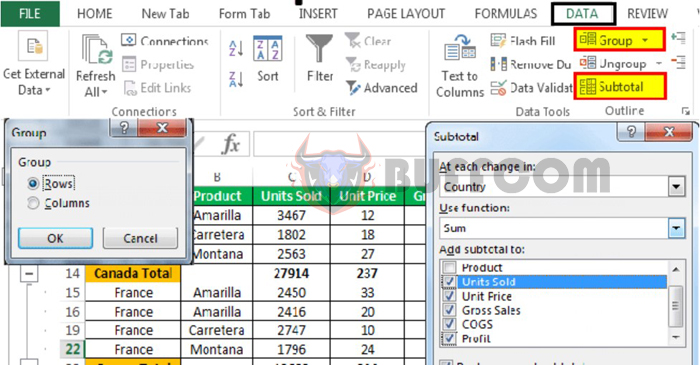
Using shortcut keys for Group in Excel is a quick way to hide/show or group rows/columns in an Excel spreadsheet. By using this method, you can save time from using the mouse and reduce errors from accidentally clicking on the wrong command button. Buffcom.net will guide you through using the Group shortcut keys in Excel easily and quickly.

1 What is Group in Excel?

To serve the purpose of data analysis and statistical work, Excel provides users with the Group function. Group in Excel allows you to easily group multiple columns or rows into one group, and you only need to perform a few steps to quickly hide and unhide data columns or rows in Excel.
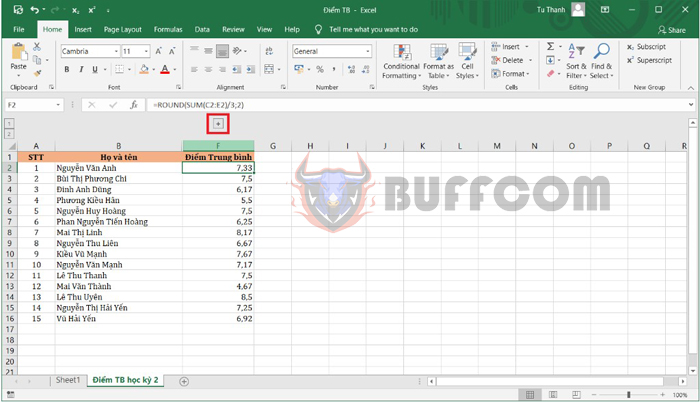
Looking at the illustration below, you can see that columns C, D, and E have been hidden.
Instructions on using shortcut keys to Group data in Excel quickly

Instructions on using shortcut keys to Group data in Excel quickly

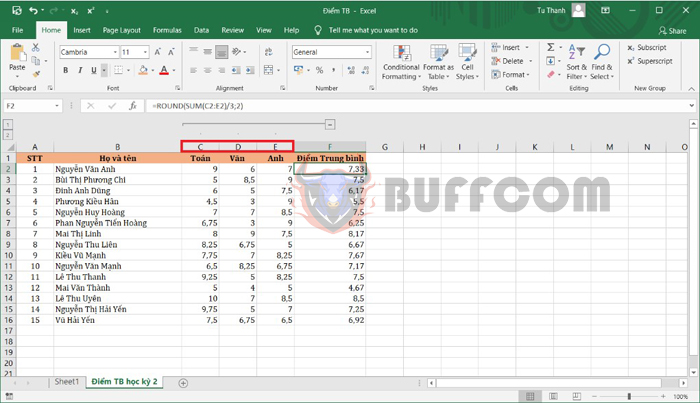
To display the hidden columns, you just need to click the plus sign on the worksheet. Immediately, the hidden 03 columns will be displayed.
Instructions on using shortcut keys to Group data in Excel quickly

Instructions on using shortcut keys to Group data in Excel quickly

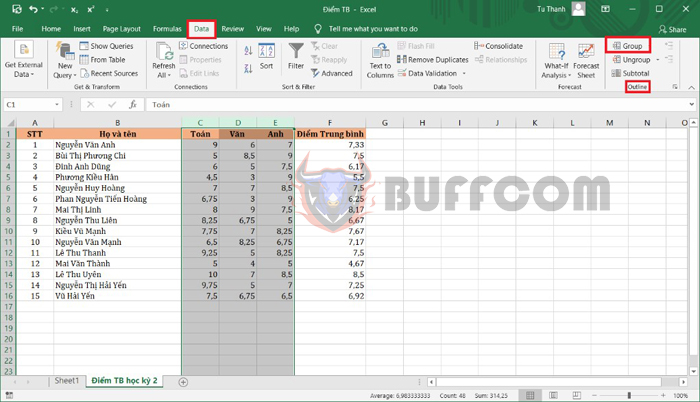
To create a Group in Excel, you usually need to select the columns or rows you want to group together. Then, on the toolbar, you go to the Data tab. Next, in the Outline group, you click on Group.
Instructions on using shortcut keys to Group data in Excel quickly

Instructions on using shortcut keys to Group data in Excel quickly

2 Shortcut Key for Group in Excel

To support users to the maximum extent, Excel has provided a shortcut key combination for Group in Excel. You can easily perform it without using the mouse or opening the Data tab.

Step 1: You select the columns or rows that you want to create a Group.

Step 2: You use the Shift Alt → key combination to create a Group.

Then, the selected columns or rows will form a Group, as shown in the illustration below.
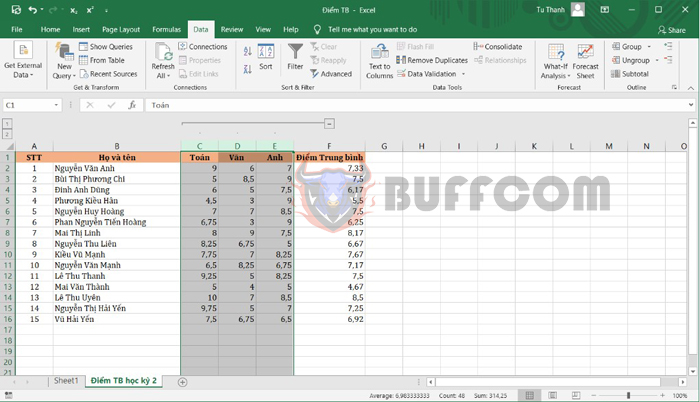
Instructions on using shortcut keys to Group data in Excel quickly

Instructions on using shortcut keys to Group data in Excel quickly

After that, you can easily click the minus sign to hide the columns in the Group. In addition, you can also create one or more Groups on the same worksheet, and easily delete a Group by using the Shift Alt ← key combination.
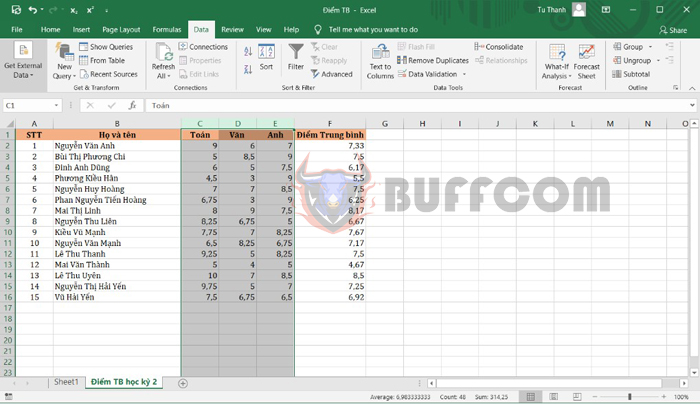
Instructions on using shortcut keys to Group data in Excel quickly

Instructions on using shortcut keys to Group data in Excel quickly

Thus, the article above from Buffcom.net has guided you on how to create and use the shortcut key for Group in Excel. Hopefully, this article will be useful for you in your work. Wish you success!


Rate this post
56
376 Views
How to calculate employee late fees on ExcelPrevHow to calculate employee late fees on ExcelFebruary 24, 2023
How to Split Text into Multiple Columns in WordFebruary 24, 2023How to Split Text into Multiple Columns in WordNext

Leave a Reply Cancel reply

You must be logged in to post a comment.

Buy Windows 11 Professional MS Products CD Key
Buy Office 2021 Professional Plus Key Global For 5 PC
Top rated products
  • Buy Office 2021 Professional Plus Key Global For 5 PC Buy Office 2021 Professional Plus Key Global For 5 PC
    Rated 5.00 out of 5
    $68.00
  • AVG Internet Security 2021 1 Device 1 Year Global AVG Internet Security 2021 1 Device 1 Year Global
    Rated 5.00 out of 5
    $11.00
  • Avast SecureLine VPN 2021 2 Years 5 Devices Global Avast SecureLine VPN 2021 2 Years 5 Devices Global
    Rated 5.00 out of 5
    $47.00
  • Windows 11 Pro Product Activation Key Windows 11 Pro Product Activation Key
    Rated 5.00 out of 5
    $6.00
  • AVG Internet Security 2021 10 Devices 1 Year Global AVG Internet Security 2021 10 Devices 1 Year Global
    Rated 5.00 out of 5
    $30.00
Products
  • Kaspersky Standard - 1 Device, 1 Year (Global License) Kaspersky Standard - 1 Device, 1 Year (Global License) $21.00
  • Windows 10 Pro N Key Global Windows 10 Pro N Key Global
    Rated 4.83 out of 5
    $10.00
  • Buy Windows 11 Professional MS Products CD Key Buy Windows 11 Professional MS Products CD Key
    Rated 5.00 out of 5
    $6.00
  • Windows 11 Home Key Global 2021 Windows 11 Home Key Global 2021
    Rated 5.00 out of 5
    $6.00
  • Microsoft Visio Professional 2010 Key 1PC Microsoft Visio Professional 2010 Key 1PC $9.00
  • Microsoft Office Home And Business 2016 For Mac Key Global Bind Microsoft Account Microsoft Office Home And Business 2016 For Mac Key Global Bind Microsoft Account
    Rated 4.92 out of 5
    $15.00
  • AVG Internet Security 2021 10 Devices 2 Years Global AVG Internet Security 2021 10 Devices 2 Years Global
    Rated 5.00 out of 5
    $42.20
  • Microsoft Project Standard 2019 - 1 PC Microsoft Project Standard 2019 - 1 PC $12.00
  • office-professional-2016-international Microsoft Office Professional Plus 2016 Retail CD Key
    Rated 4.92 out of 5
    $13.00
  • AVG Ultimate 2021 with Antivirus + Cleaner, Secure VPN 10 Devices 2 Years AVG Ultimate 2021 with Antivirus + Cleaner, Secure VPN 10 Devices 2 Years
    Rated 5.00 out of 5
    $47.00
Product categories
  • Anti Virus
  • Microsoft Office
  • Microsoft Project
  • Microsoft Visio
  • Microsoft Visual
  • Microsoft Windows
  • Other Software
  • Uncategorized

Buffcom.net always brings the best digital products and services to you. Specializing in Office Software and online marketing services

BIG SALE 50% IN MAY

Microsoft Office
Microsoft Windows
Anti-Virus
Contact Us

Visit Us:

125 Division St, New York, NY 10002, USA

Mail Us:

buffcom.net@gmail.com

TERMS & CONDITIONS | PAYMENT GUIDE  | SHIPPING POLICY  | REFUND POLICY

Copyright © 2019 buffcom.net  All Rights Reserved.