
• Microsoft Office
  • Microsoft Windows
  • Other Software
    • Microsoft Visual
    • Microsoft Project
    • Microsoft Visio
    • Anti Virus
  • Blog
    • Word
    • Excel
    • Powerpoint
    • Software tricks/tips

No products in the cart.

  • Microsoft Office
  • Microsoft Windows
  • Other Software
    • Microsoft Visual
    • Microsoft Project
    • Microsoft Visio
    • Anti Virus
  • Blog
    • Word
    • Excel
    • Powerpoint
    • Software tricks/tips

No products in the cart.

  • Microsoft Office
  • Microsoft Windows
  • Other Software
    • Microsoft Visual
    • Microsoft Project
    • Microsoft Visio
    • Anti Virus
  • Blog
    • Word
    • Excel
    • Powerpoint
    • Software tricks/tips

No products in the cart.

  • Microsoft Office
  • Microsoft Windows
  • Other Software
    • Microsoft Visual
    • Microsoft Project
    • Microsoft Visio
    • Anti Virus
  • Blog
    • Word
    • Excel
    • Powerpoint
    • Software tricks/tips
Excel

How to change measurement units to centimeters in Word and Excel
0 Comments

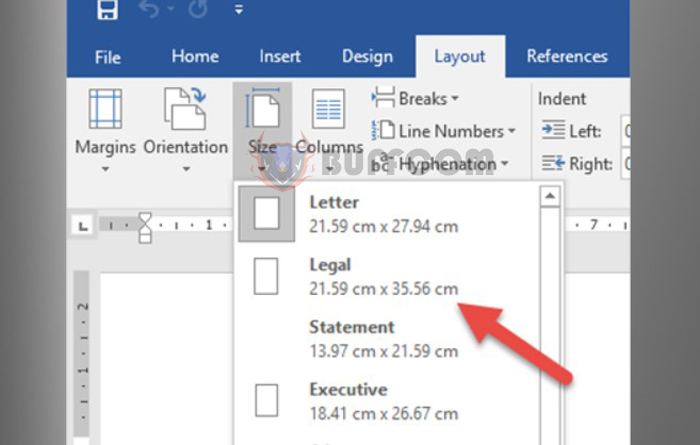
How to change measurement units to centimeters in Word and Excel: By default, the measurement units in Word and Excel from 2007 onwards are in inches. This unit is commonly used in countries such as the US, but it is not suitable for Vietnam where centimeters (cm) are widely used. However, you can change the unit from inches to cm in Word and Excel if desired. Follow the steps below to learn how.

1. Change measurement units to cm in Excel

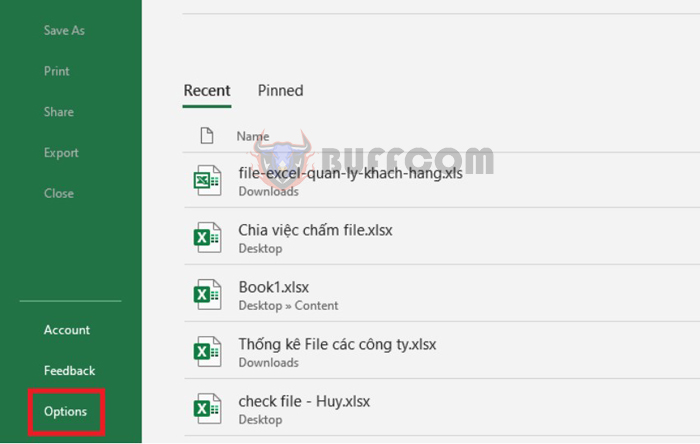
Step 1: To change the measurement units to cm in Excel, first open any Excel file. Then select the File tab on the toolbar. In the File interface, select the Options menu in the lower-left corner of the screen.
How to change measurement units to centimeters in Word and Excel

How to change measurement units to centimeters in Word and Excel

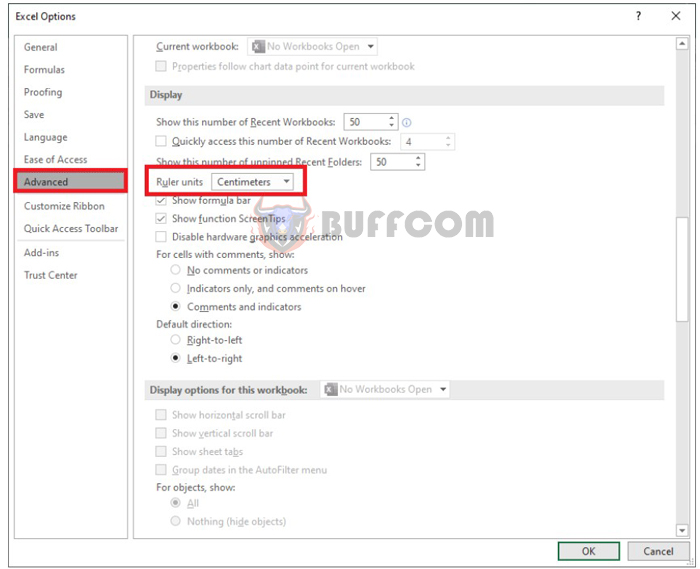
Step 2: Now, the Excel Options window appears. Select the Advanced tab on the left-hand side. Then scroll down to the Display section, select Centimeters in the Ruler units section. Finally, click OK to complete the setup. That’s it! The measurement units in Excel have been quickly changed to centimeters.
How to change measurement units to centimeters in Word and Excel

How to change measurement units to centimeters in Word and Excel

2. Change measurement units to cm in Word

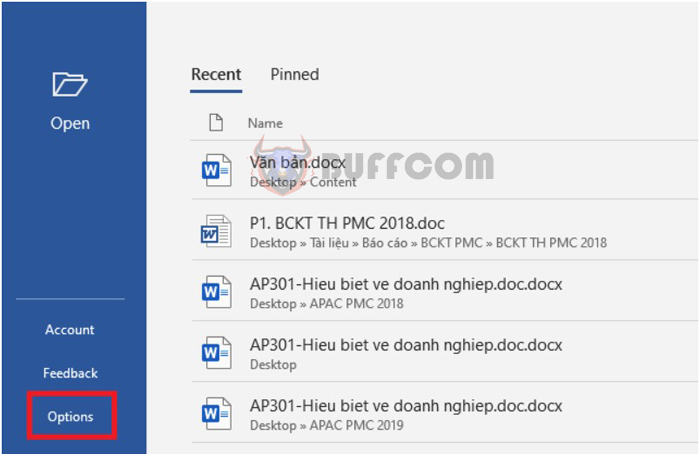
Step 1: To change the measurement units to cm in Word, first open any Word file. Then select the File tab on the toolbar. In the File interface, select the Options menu in the lower-left corner of the screen.
How to change measurement units to centimeters in Word and Excel

How to change measurement units to centimeters in Word and Excel

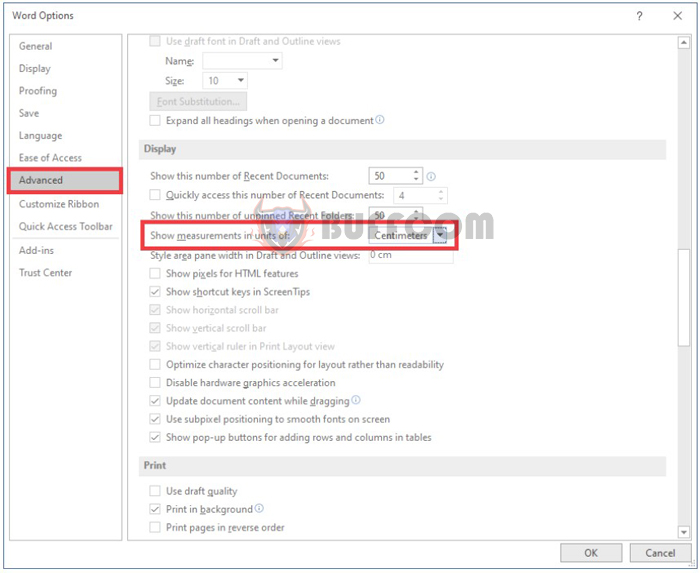
Step 2: Now, the Word Options window appears. Select the Advanced tab on the left-hand side. Then scroll down to the Display section, select Centimeters in the Show measurements in units of section. Finally, click OK to complete the setup. That’s it! The measurement units in Word have been changed to centimeters.
How to change measurement units to centimeters in Word and Excel

How to change measurement units to centimeters in Word and Excel

In conclusion, this article has provided you with the steps to change measurement units to centimeters in Word and Excel. We hope this article is helpful to you in your work. Good luck!

Rate this post
46
314 Views
2 easy ways to remove gridlines in ExcelPrev2 easy ways to remove gridlines in ExcelMarch 29, 2023
How to Fold a Laptop While Still Running Windows 10March 29, 2023How to Fold a Laptop While Still Running Windows 10Next

Leave a Reply Cancel reply

You must be logged in to post a comment.

Buy Windows 11 Professional MS Products CD Key
Buy Office 2021 Professional Plus Key Global For 5 PC
Top rated products
  • Kaspersky Internet Security 2021 1 year 5 devices key Global Kaspersky Internet Security 2021 1 year 5 devices key Global
    Rated 5.00 out of 5
    $45.00
  • Windows Server 2022 Datacenter Key Global Windows Server 2022 Datacenter Key Global
    Rated 5.00 out of 5
    $7.00
  • Kaspersky Small Office Security 10 PCs + 10 Mobiles + 1 Server 1 Year Kaspersky Small Office Security 10 PCs + 10 Mobiles + 1 Server 1 Year
    Rated 5.00 out of 5
    $164.50
  • Avast Ultimate Suite 2021 1 Year 10 Devices Global Avast Ultimate Suite 2021 1 Year 10 Devices Global
    Rated 5.00 out of 5
    $54.00
  • Windows 11 Pro Key Global Windows 11 Pro Key Global
    Rated 5.00 out of 5
    $6.00
Products
  • Windows 10 Pro Key Global Windows 10 Pro Key Global
    Rated 4.74 out of 5
    $6.00
  • Buy Microsoft Office Professional Plus 2019 CD Key Global - 5 PC Buy Microsoft Office Professional Plus 2019 CD Key Global - 5 PC
    Rated 4.95 out of 5
    $32.00
  • Microsoft Project 2019 Professional Key Global Microsoft Project 2019 Professional - 5 PC
    Rated 4.97 out of 5
    $12.00
  • Kaspersky Total Security 2021 1 year 1 device key Global Kaspersky Total Security 2021 1 year 1 device key Global
    Rated 5.00 out of 5
    $27.00
  • SQL Server 2019 Standard SQL Server 2019 Standard $20.00
  • Windows 11 Pro Product Activation Key Windows 11 Pro Product Activation Key
    Rated 5.00 out of 5
    $6.00
  • office-professional-2016-international Microsoft Office Professional Plus 2016 Retail CD Key
    Rated 4.92 out of 5
    $13.00
  • Windows 10 Pro OEM Key Global - Reinstalling win is still active Windows 10 Pro OEM Key Global - Reinstalling win is still active
    Rated 4.88 out of 5
    $6.00
  • Windows 10 Enterprise LTSC 2019 Key Global Windows 10 Enterprise LTSC 2019 Key Global
    Rated 4.83 out of 5
    $9.00
  • Microsoft Visual Studio 2022 Professional Key Microsoft Visual Studio 2022 Professional Key $19.00
Product categories
  • Anti Virus
  • Microsoft Office
  • Microsoft Project
  • Microsoft Visio
  • Microsoft Visual
  • Microsoft Windows
  • Other Software
  • Uncategorized

Buffcom.net always brings the best digital products and services to you. Specializing in Office Software and online marketing services

BIG SALE 50% IN MAY

Microsoft Office
Microsoft Windows
Anti-Virus
Contact Us

Visit Us:

125 Division St, New York, NY 10002, USA

Mail Us:

buffcom.net@gmail.com

TERMS & CONDITIONS | PAYMENT GUIDE  | SHIPPING POLICY  | REFUND POLICY

Copyright © 2019 buffcom.net  All Rights Reserved.