• Microsoft Office
  • Microsoft Windows
  • Other Software
    • Microsoft Visual
    • Microsoft Project
    • Microsoft Visio
    • Anti Virus
  • Blog
    • Word
    • Excel
    • Powerpoint
    • Software tricks/tips

No products in the cart.

  • Microsoft Office
  • Microsoft Windows
  • Other Software
    • Microsoft Visual
    • Microsoft Project
    • Microsoft Visio
    • Anti Virus
  • Blog
    • Word
    • Excel
    • Powerpoint
    • Software tricks/tips

No products in the cart.

  • Microsoft Office
  • Microsoft Windows
  • Other Software
    • Microsoft Visual
    • Microsoft Project
    • Microsoft Visio
    • Anti Virus
  • Blog
    • Word
    • Excel
    • Powerpoint
    • Software tricks/tips

No products in the cart.

  • Microsoft Office
  • Microsoft Windows
  • Other Software
    • Microsoft Visual
    • Microsoft Project
    • Microsoft Visio
    • Anti Virus
  • Blog
    • Word
    • Excel
    • Powerpoint
    • Software tricks/tips
Software tricks/tips

Troubleshooting WinRAR’s Diagnostic Messages Error
0 Comments

It can be frustrating when you spend time downloading a file to your computer only to encounter an error when trying to extract it. Today, I will guide you on how to troubleshoot WinRAR extraction errors.

Method 1: Repairing the Archive

Step 1: Open the WinRAR application by double-clicking on the file.

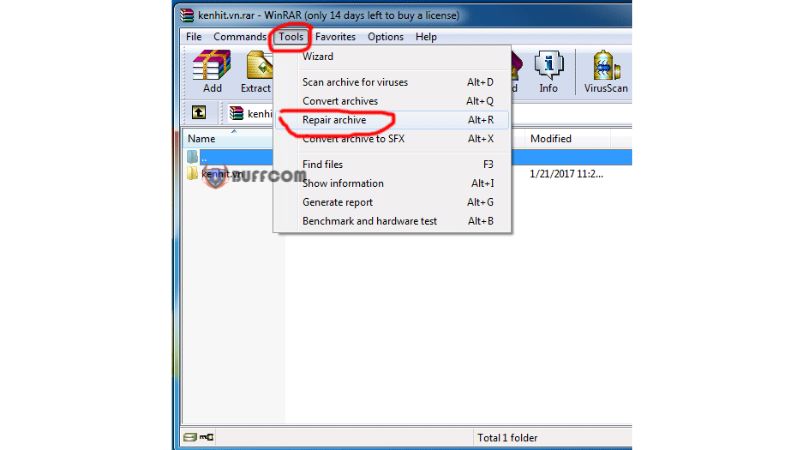
Step 2: Select the “Tool” tab and choose “Repair archive.”

WinRARs Diagnostic Messages Error 1Step 3: Click on “Browse” to select the location for the repaired file. You can choose either RAR or ZIP format and click “OK.”
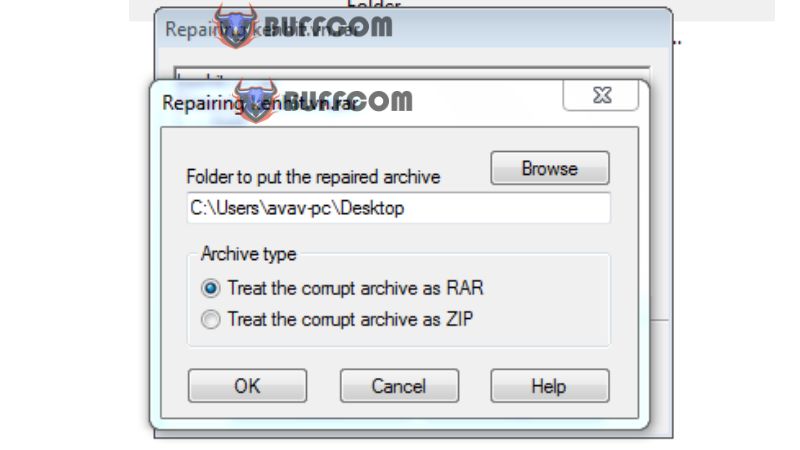
WinRARs Diagnostic Messages Error 2Once you click “OK,” the repair process will begin. After completion, click “Close.” Now, try extracting the file again.
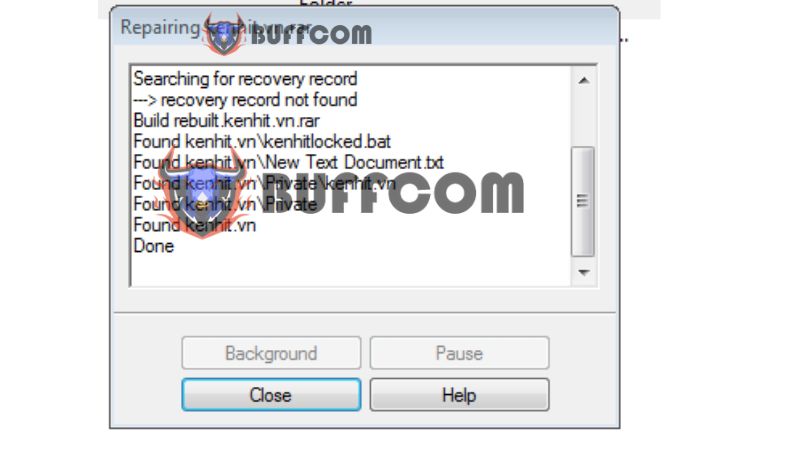
WinRARs Diagnostic Messages Error 3Method 2: Updating WinRAR

If you encounter extraction errors in WinRAR, it could be due to using an older version of WinRAR compared to the version used to compress the file.

To resolve this, follow these steps:

Download the latest version of WinRAR from the official website.
Install the latest version of WinRAR.
Restart your computer.
Try extracting the file again.
These are two common issues that can occur when using WinRAR. If you encounter any other errors, feel free to share them with others for further troubleshooting. Good luck!

If you are looking to purchase a Windows key, please contact Buffcom.net for assistance!
Rate this post
40
327 Views
Guide To Removing Stubborn Files From Your Hard Drive With LockHunterPrevGuide To Removing Stubborn Files From Your Hard Drive With LockHunterMay 25, 2023
How To Completely Delete Files On A ComputerMay 25, 2023How To Completely Delete Files On A ComputerNext

Leave a Reply Cancel reply

You must be logged in to post a comment.

Buy Windows 11 Professional MS Products CD Key
Buy Office 2021 Professional Plus Key Global For 5 PC
Top rated products
  • AVG Internet Security 2021 1 Device 1 Year Global AVG Internet Security 2021 1 Device 1 Year Global
    Rated 5.00 out of 5
    $11.00
  • Buy Office 2021 Professional Plus Key Global For 5 PC Buy Office 2021 Professional Plus Key Global For 5 PC
    Rated 5.00 out of 5
    $68.00
  • Avast SecureLine VPN 2021 2 Years 5 Devices Global Avast SecureLine VPN 2021 2 Years 5 Devices Global
    Rated 5.00 out of 5
    $47.00
  • Windows 11 Pro Product Activation Key Windows 11 Pro Product Activation Key
    Rated 5.00 out of 5
    $6.00
  • AVG Internet Security 2021 10 Devices 1 Year Global AVG Internet Security 2021 10 Devices 1 Year Global
    Rated 5.00 out of 5
    $30.00
Products
  • Microsoft Visio 2019 Professional Key Global Microsoft Visio 2019 Professional Key Global - 5 PC
    Rated 4.93 out of 5
    $19.00
  • Windows Server2008 R2 Remote Desktop Services device connections (20)cal Windows Server2008 R2 Remote Desktop Services device connections (20)cal $29.00
  • Microsoft Project Standard 2019 - 1 PC Microsoft Project Standard 2019 - 1 PC $12.00
  • microsoft office home and business 2019 pcmac key Microsoft Office Home And Business 2019 (MAC) key bind to your Microsoft account
    Rated 4.95 out of 5
    $30.00
  • Windows Server 2016 Datacenter Key Global Windows Server 2016 Datacenter Key Global
    Rated 4.74 out of 5
    $10.00
  • Microsoft Visio Professional 2013 Key 1PC Microsoft Visio Professional 2013 Key 1PC $9.00
  • Windows 10 Pro N Key Global Windows 10 Pro N Key Global
    Rated 4.83 out of 5
    $10.00
  • Microsoft Visual Studio Enterprise 2019 For 1 PC Microsoft Visual Studio Enterprise 2019 For 1 PC
    Rated 4.88 out of 5
    $15.00
  • Windows Server 2025 Datacenter Windows Server 2025 Datacenter $30.00
  • AVG Internet Security 2021 1 Device 1 Year Global AVG Internet Security 2021 1 Device 1 Year Global
    Rated 5.00 out of 5
    $11.00
Product categories
  • Anti Virus
  • Microsoft Office
  • Microsoft Project
  • Microsoft Visio
  • Microsoft Visual
  • Microsoft Windows
  • Other Software
  • Uncategorized

Buffcom.net always brings the best digital products and services to you. Specializing in Office Software and online marketing services

BIG SALE 50% IN MAY

Microsoft Office
Microsoft Windows
Anti-Virus
Contact Us

Visit Us:

125 Division St, New York, NY 10002, USA

Mail Us:

buffcom.net@gmail.com

TERMS & CONDITIONS | PAYMENT GUIDE  | SHIPPING POLICY  | REFUND POLICY

Copyright © 2019 buffcom.net  All Rights Reserved.