
• Microsoft Office
  • Microsoft Windows
  • Other Software
    • Microsoft Visual
    • Microsoft Project
    • Microsoft Visio
    • Anti Virus
  • Blog
    • Word
    • Excel
    • Powerpoint
    • Software tricks/tips

No products in the cart.

  • Microsoft Office
  • Microsoft Windows
  • Other Software
    • Microsoft Visual
    • Microsoft Project
    • Microsoft Visio
    • Anti Virus
  • Blog
    • Word
    • Excel
    • Powerpoint
    • Software tricks/tips

No products in the cart.

  • Microsoft Office
  • Microsoft Windows
  • Other Software
    • Microsoft Visual
    • Microsoft Project
    • Microsoft Visio
    • Anti Virus
  • Blog
    • Word
    • Excel
    • Powerpoint
    • Software tricks/tips

No products in the cart.

  • Microsoft Office
  • Microsoft Windows
  • Other Software
    • Microsoft Visual
    • Microsoft Project
    • Microsoft Visio
    • Anti Virus
  • Blog
    • Word
    • Excel
    • Powerpoint
    • Software tricks/tips
Excel

How to color alternate columns in Excel
0 Comments

How to color alternate columns in Excel: Coloring alternate columns can make your document more visually appealing and easier to read, preventing confusion between one column and another in a data-packed table. Imagine an Excel spreadsheet with monotonous data columns – it can be difficult for the viewer to distinguish between them. Of course, you can manually fill the background color of each column, but this takes up a lot of time. Don’t worry, there’s a simple trick to automatically color alternate columns in Excel, making them look professional and visually pleasing. Read on for the steps.

Step 1: Select the range to be colored

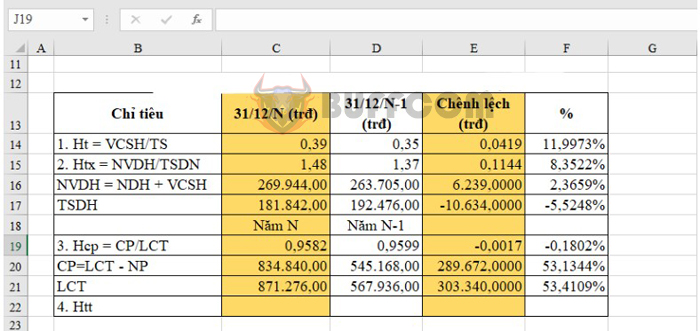
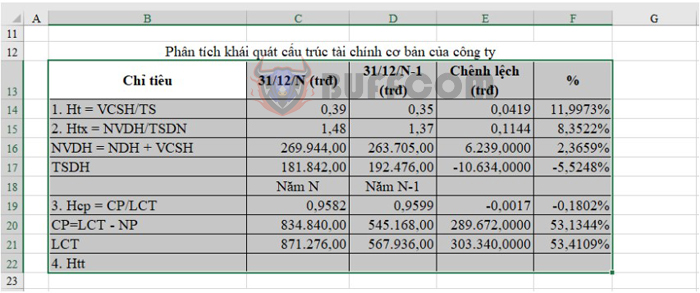
To color the columns, select the range of data you want to color by clicking and dragging your mouse across the desired range. In the example below, the selected range is from B13 to F22.
How to color alternate columns in Excel

How to color alternate columns in Excel

Step 2: Open the New Formatting Rule window

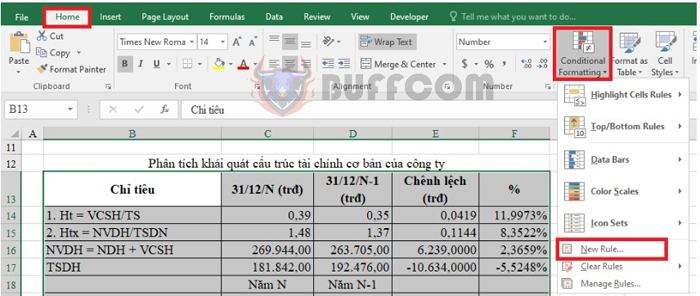
On the toolbar, click on the Home tab, then choose Conditional Formatting. In the dropdown list, select New Rule. The New Formatting Rule window will appear.
How to color alternate columns in Excel

How to color alternate columns in Excel

Step 3: Set up the New Formatting Rule

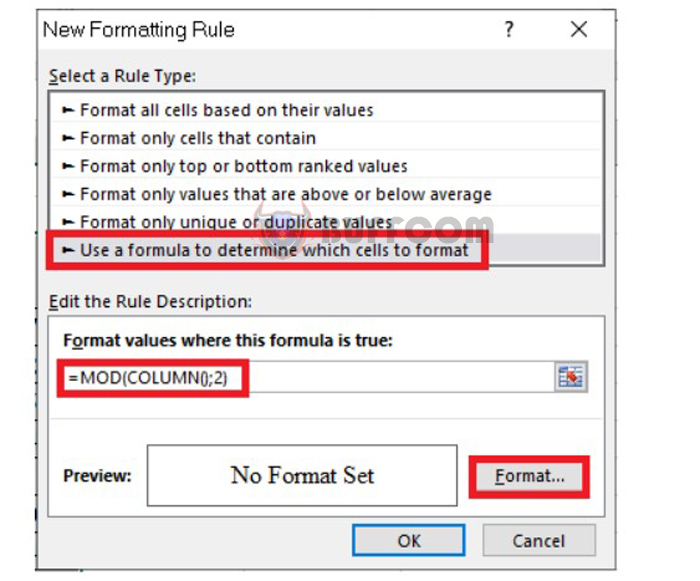
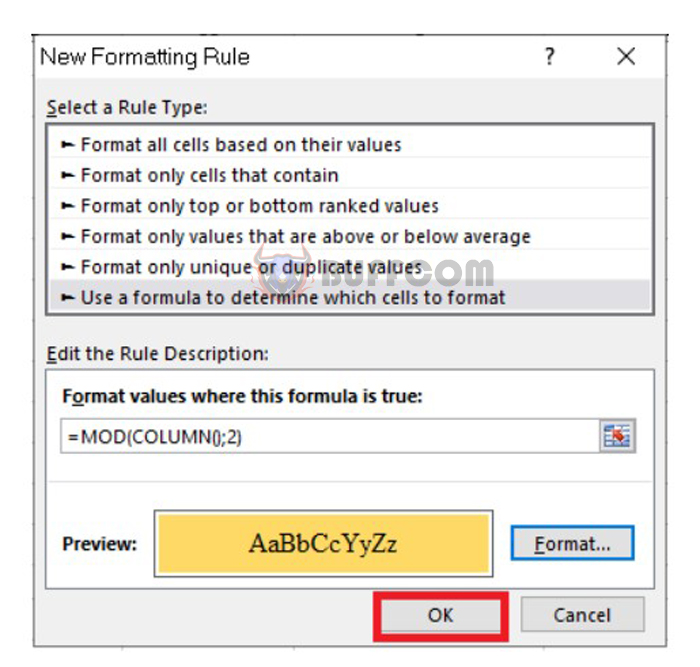
In the New Formatting Rule window, set up the rule as follows:

  • Under Select a Rule Type, choose Use a Formula to determine which cells to format.
  • Under Format values where this formula is true, enter the formula =MOD(COLUMN(),2).

Next, click on the Format button to fill the column with color.
How to color alternate columns in Excel

How to color alternate columns in Excel

Step 4: Color the alternate columns

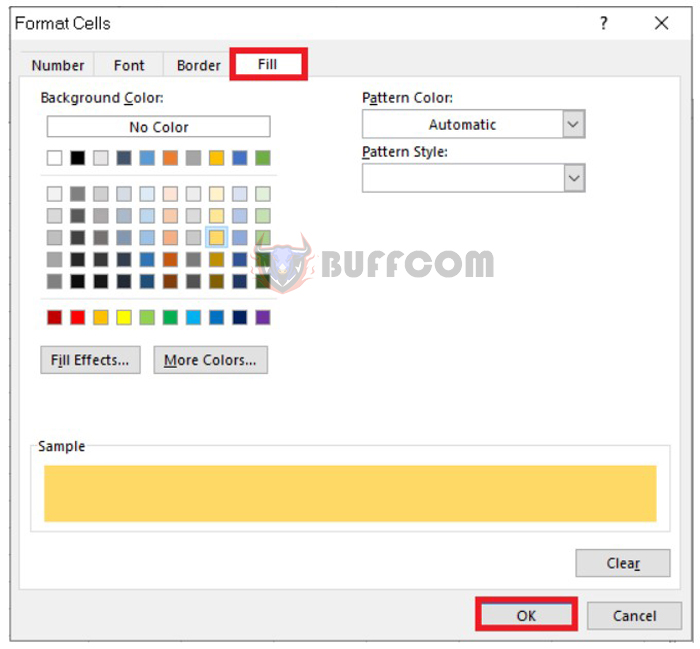
After clicking on Format, the Format Cells dialog box will appear. Select the Fill tab and then choose the color you want to fill the column with from the Background Color section. Click OK to close the dialog box.
How to color alternate columns in Excel

How to color alternate columns in Excel

After closing the Format Cells dialog box, click OK on the New Formatting Rule window to complete the process.
How to color alternate columns in Excel

How to color alternate columns in Excel

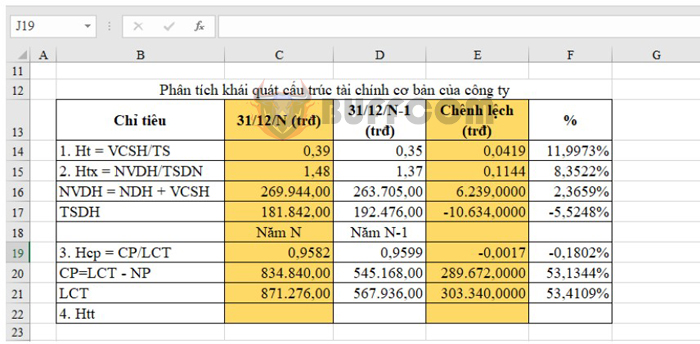
The result will look like this. It’s that simple!
How to color alternate columns in Excel

How to color alternate columns in Excel

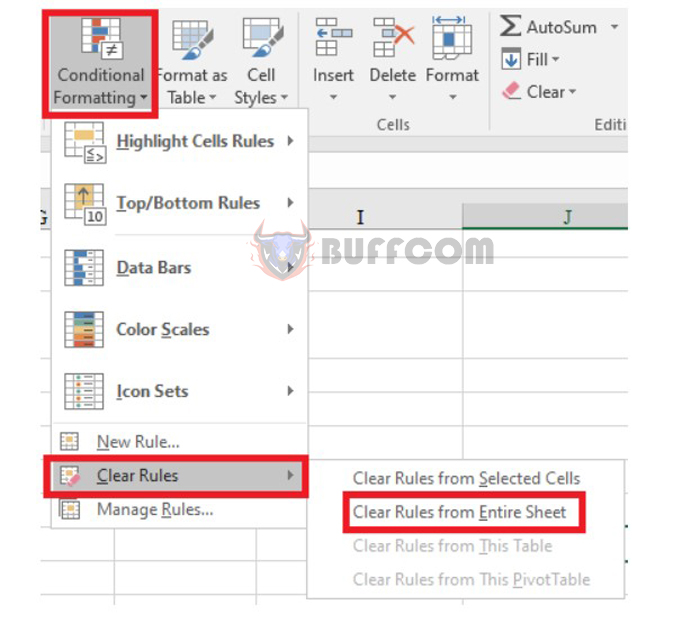
To remove these formats for the column, go to Conditional Formatting and select Clear Rule.
How to color alternate columns in Excel

How to color alternate columns in Excel

Those are the four steps to color alternate columns in Microsoft Excel. This is one of the ways to make your spreadsheet look more attractive and less monotonous. We hope you find this useful and wish you success.


Rate this post
49
319 Views
How to increase the number of Undo operations in Word, ExcelPrevHow to increase the number of Undo operations in Word, ExcelMarch 16, 2023
Fixing errors in merging drives and partitions on WindowsMarch 16, 2023Fixing errors in merging drives and partitions on WindowsNext

Leave a Reply Cancel reply

You must be logged in to post a comment.

Buy Windows 11 Professional MS Products CD Key
Buy Office 2021 Professional Plus Key Global For 5 PC
Top rated products
  • AVG Internet Security 2021 10 Devices 2 Years Global AVG Internet Security 2021 10 Devices 2 Years Global
    Rated 5.00 out of 5
    $42.20
  • Trend Micro Maximum Security 3 Devices 1 Year key Global Trend Micro Maximum Security 3 Devices 1 Year key Global
    Rated 5.00 out of 5
    $15.00
  • Windows 11 Home Key Global 2021 Windows 11 Home Key Global 2021
    Rated 5.00 out of 5
    $6.00
  • Windows Server 2022 Remote Desktop Services User Connections (50) Cal Key Global Windows Server 2022 Remote Desktop Services User Connections (50) Cal Key Global
    Rated 5.00 out of 5
    $22.00
  • AVG Ultimate 2021 with Antivirus + Cleaner, Secure VPN 10 Devices 2 Years AVG Ultimate 2021 with Antivirus + Cleaner, Secure VPN 10 Devices 2 Years
    Rated 5.00 out of 5
    $47.00
Products
  • Windows Server2008 R2 Remote Desktop Services user connections (20)cal Windows Server2008 R2 Remote Desktop Services user connections (20)cal $29.00
  • Buy Microsoft Office Professional Plus 2019 CD Key Global - 5 PC Buy Microsoft Office Professional Plus 2019 CD Key Global - 5 PC
    Rated 4.95 out of 5
    $32.00
  • AVG Internet Security 2021 1 Device 1 Year Global AVG Internet Security 2021 1 Device 1 Year Global
    Rated 5.00 out of 5
    $11.00
  • Avast Ultimate Suite 2021 3 Years 10 Devices Global Avast Ultimate Suite 2021 3 Years 10 Devices Global
    Rated 5.00 out of 5
    $90.00
  • Windows 11 Home Key Global 2021 Windows 11 Home Key Global 2021
    Rated 5.00 out of 5
    $6.00
  • AVG Internet Security 2021 10 Devices 2 Years Global AVG Internet Security 2021 10 Devices 2 Years Global
    Rated 5.00 out of 5
    $42.20
  • Windows 11 Pro Product Activation Key Windows 11 Pro Product Activation Key
    Rated 5.00 out of 5
    $6.00
  • Windows Server 2025 Datacenter Windows Server 2025 Datacenter $30.00
  • Windows Server 2016 Remote Desktop Services 50 USER Connections Key Global Windows Server 2016 Remote Desktop Services 50 USER Connections Key Global
    Rated 4.74 out of 5
    $15.00
  • Project Professional 2024 Project Professional 2024 $43.00
Product categories
  • Anti Virus
  • Microsoft Office
  • Microsoft Project
  • Microsoft Visio
  • Microsoft Visual
  • Microsoft Windows
  • Other Software
  • Uncategorized

Buffcom.net always brings the best digital products and services to you. Specializing in Office Software and online marketing services

BIG SALE 50% IN MAY

Microsoft Office
Microsoft Windows
Anti-Virus
Contact Us

Visit Us:

125 Division St, New York, NY 10002, USA

Mail Us:

buffcom.net@gmail.com

TERMS & CONDITIONS | PAYMENT GUIDE  | SHIPPING POLICY  | REFUND POLICY

Copyright © 2019 buffcom.net  All Rights Reserved.