• Microsoft Office
  • Microsoft Windows
  • Other Software
    • Microsoft Visual
    • Microsoft Project
    • Microsoft Visio
    • Anti Virus
  • Blog
    • Word
    • Excel
    • Powerpoint
    • Software tricks/tips

No products in the cart.

  • Microsoft Office
  • Microsoft Windows
  • Other Software
    • Microsoft Visual
    • Microsoft Project
    • Microsoft Visio
    • Anti Virus
  • Blog
    • Word
    • Excel
    • Powerpoint
    • Software tricks/tips

No products in the cart.

  • Microsoft Office
  • Microsoft Windows
  • Other Software
    • Microsoft Visual
    • Microsoft Project
    • Microsoft Visio
    • Anti Virus
  • Blog
    • Word
    • Excel
    • Powerpoint
    • Software tricks/tips

No products in the cart.

  • Microsoft Office
  • Microsoft Windows
  • Other Software
    • Microsoft Visual
    • Microsoft Project
    • Microsoft Visio
    • Anti Virus
  • Blog
    • Word
    • Excel
    • Powerpoint
    • Software tricks/tips
Excel

Adding Seconds to Time in Excel
0 Comments

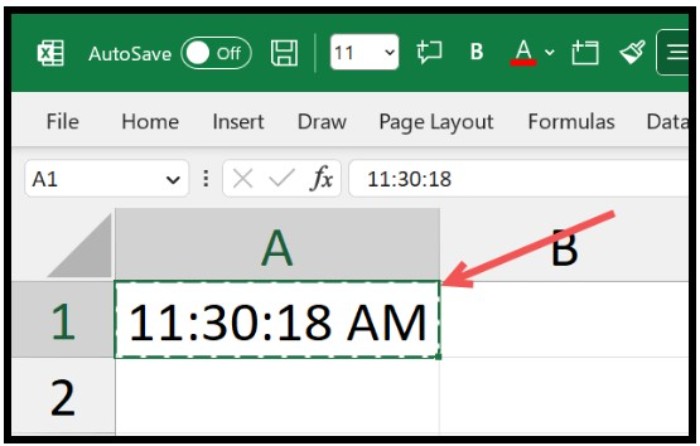
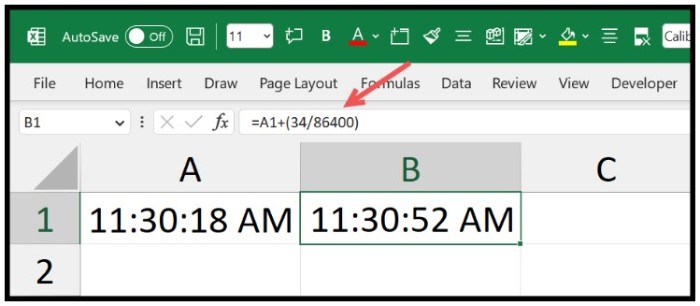
Adding Seconds to Time in Excel. To add seconds to a time value in Excel, you can use a simple formula that involves dividing the seconds by the total seconds in a day (86400) and then adding the result to the original time value. For instance, suppose you have a time value of 11:30:18 AM in cell A1, and you want to add 34 seconds to it.Adding Seconds to Time in Excel 1
Adding Seconds to Time in Excel

Formula 1: Using Operators

Follow these steps:

  1. Type the equal sign in a cell and refer to the cell with the original time value.
  2. Type the plus sign, followed by an opening parenthesis.
  3. Enter the number of seconds to add, followed by a division sign and the total number of seconds in a day (86400).
  4. Close the parenthesis and press Enter.
    Adding Seconds to Time in Excel

    Adding Seconds to Time in Excel

The formula will look like this: =A1+(34/86400)

Formula 2: Using the TIME Function

You can also use Excel’s TIME function to add seconds to a time value. Here’s an example:

  1. Refer to the cell with the original time value.
  2. Type the plus sign, followed by the TIME function.
  3. Within the TIME function, enter zero for hours and minutes, and the number of seconds to add.
  4. Close the parenthesis and press Enter.
    Adding Seconds to Time in Excel

    Adding Seconds to Time in Excel

The formula will look like this: =A1+TIME(0,0,34)

Rate this post
47
290 Views
Summing Time in Excel: Formula and FormattingPrevSumming Time in Excel: Formula and FormattingMay 8, 2023
Changing The Theme Of A Worksheet In ExcelMay 8, 2023Changing The Theme Of A Worksheet In ExcelNext

Leave a Reply Cancel reply

You must be logged in to post a comment.

Buy Windows 11 Professional MS Products CD Key
Buy Office 2021 Professional Plus Key Global For 5 PC
Top rated products
  • Avast Premium Security 2021 10 Devices 1 Year Global Avast Premium Security 2021 10 Devices 1 Year Global
    Rated 5.00 out of 5
    $28.00
  • Avast Ultimate Suite 2021 3 Years 10 Devices Global Avast Ultimate Suite 2021 3 Years 10 Devices Global
    Rated 5.00 out of 5
    $90.00
  • Windows Server 2022 Remote Desktop Services Device Connections (50) Cal Key Global Windows Server 2022 Remote Desktop Services Device Connections (50) Cal Key Global
    Rated 5.00 out of 5
    $22.00
  • Kaspersky Internet Security 2021 1 year 1 device key Global Kaspersky Internet Security 2021 1 year 1 device key Global
    Rated 5.00 out of 5
    $24.00
  • Kaspersky Internet Security 2021 1 year 5 devices key Global Kaspersky Internet Security 2021 1 year 5 devices key Global
    Rated 5.00 out of 5
    $45.00
Products
  • Microsoft Project 2019 professional Key Global Bind to your Microsoft Account Microsoft Project 2019 professional Key Global Bind to your Microsoft Account
    Rated 4.93 out of 5
    $12.00
  • Microsoft Visio Professional 2013 Key 1PC Microsoft Visio Professional 2013 Key 1PC $9.00
  • Microsoft Visio 2019 Professional Key Global Microsoft Visio 2019 Professional Key Global - 5 PC
    Rated 4.93 out of 5
    $19.00
  • Windows Server2008 R2 Remote Desktop Services device connections (20)cal Windows Server2008 R2 Remote Desktop Services device connections (20)cal $29.00
  • Windows 10 Home Key Global Windows 10 Home Key Global
    Rated 4.81 out of 5
    $10.00
  • Microsoft Visio Standard 2019 Key 1PC Microsoft Visio Standard 2019 Key 1PC $12.00
  • Buy Windows 11 Pro CD Key License Buy Windows 11 Pro CD Key License
    Rated 5.00 out of 5
    $6.00
  • Windows 10 Enterprise Key Global Windows 10 Enterprise Key Global
    Rated 4.82 out of 5
    $9.00
  • Windows Server 2025 Standard Windows Server 2025 Standard $30.00
  • AVG Internet Security 2021 10 Devices 1 Year Global AVG Internet Security 2021 10 Devices 1 Year Global
    Rated 5.00 out of 5
    $30.00
Product categories
  • Anti Virus
  • Microsoft Office
  • Microsoft Project
  • Microsoft Visio
  • Microsoft Visual
  • Microsoft Windows
  • Other Software
  • Uncategorized

Buffcom.net always brings the best digital products and services to you. Specializing in Office Software and online marketing services

BIG SALE 50% IN MAY

Microsoft Office
Microsoft Windows
Anti-Virus
Contact Us

Visit Us:

125 Division St, New York, NY 10002, USA

Mail Us:

buffcom.net@gmail.com

TERMS & CONDITIONS | PAYMENT GUIDE  | SHIPPING POLICY  | REFUND POLICY

Copyright © 2019 buffcom.net  All Rights Reserved.