
• Microsoft Office
  • Microsoft Windows
  • Other Software
    • Microsoft Visual
    • Microsoft Project
    • Microsoft Visio
    • Anti Virus
  • Blog
    • Word
    • Excel
    • Powerpoint
    • Software tricks/tips

No products in the cart.

  • Microsoft Office
  • Microsoft Windows
  • Other Software
    • Microsoft Visual
    • Microsoft Project
    • Microsoft Visio
    • Anti Virus
  • Blog
    • Word
    • Excel
    • Powerpoint
    • Software tricks/tips

No products in the cart.

  • Microsoft Office
  • Microsoft Windows
  • Other Software
    • Microsoft Visual
    • Microsoft Project
    • Microsoft Visio
    • Anti Virus
  • Blog
    • Word
    • Excel
    • Powerpoint
    • Software tricks/tips

No products in the cart.

  • Microsoft Office
  • Microsoft Windows
  • Other Software
    • Microsoft Visual
    • Microsoft Project
    • Microsoft Visio
    • Anti Virus
  • Blog
    • Word
    • Excel
    • Powerpoint
    • Software tricks/tips
Excel

COUNT vs COUNTA (Function Difference with Example)
0 Comments

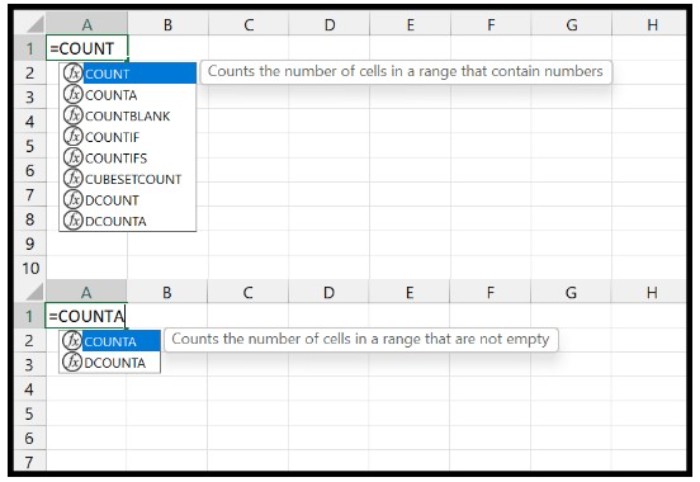
Excel has two commonly used functions, COUNT and COUNTA, that work similarly but have one significant difference that you need to understand to use them effectively.

COUNT: This function counts cells that contain numbers as a value. For example, if there are 5 cells in the range A1:A10 with numeric values, COUNT will return 5 as the result.
COUNT vs COUNTA (Function Difference with Example)

COUNT vs COUNTA (Function Difference with Example)

COUNTA: This function counts cells with values, including non-empty or non-blank cells. For instance, if there are 7 cells in the range A1:A10 with any value, COUNTA will return 7 as the result.

Example to Understand the Difference Between COUNT and COUNTA
COUNT vs COUNTA (Function Difference with Example)

COUNT vs COUNTA (Function Difference with Example)

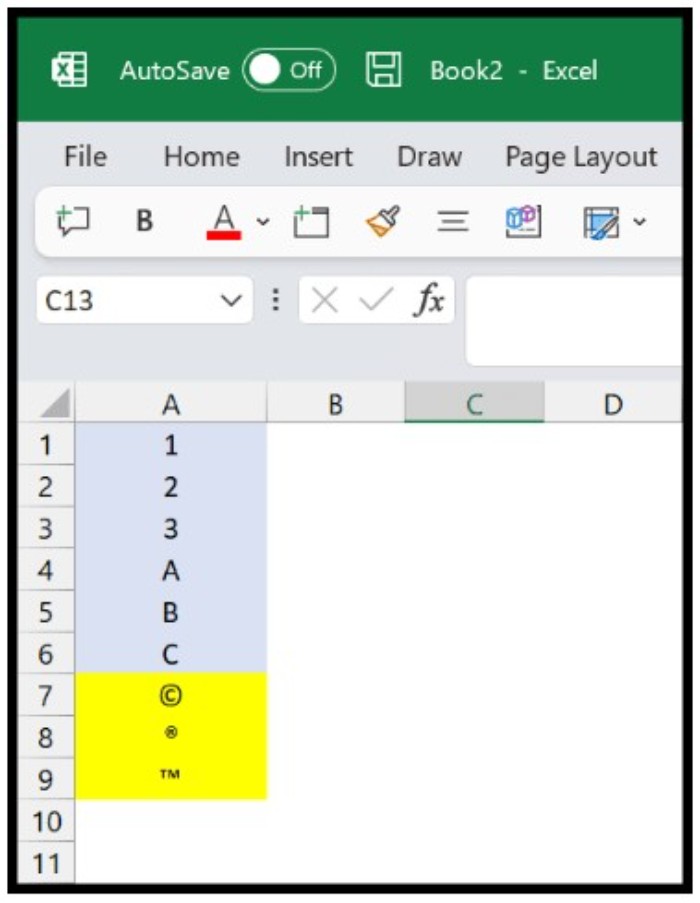
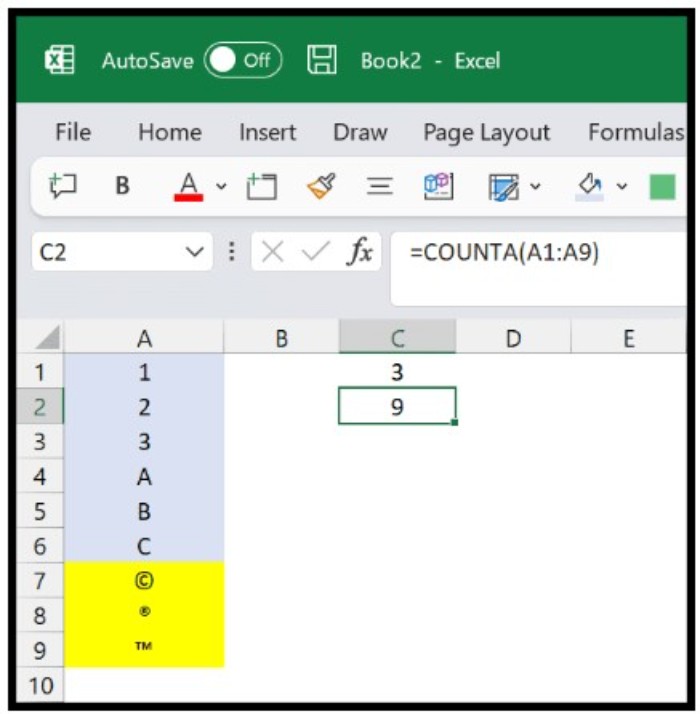
Let’s consider an example where we have a list of values in column A that includes numbers, text, symbols, and blank cells.
COUNT vs COUNTA (Function Difference with Example)

COUNT vs COUNTA (Function Difference with Example)

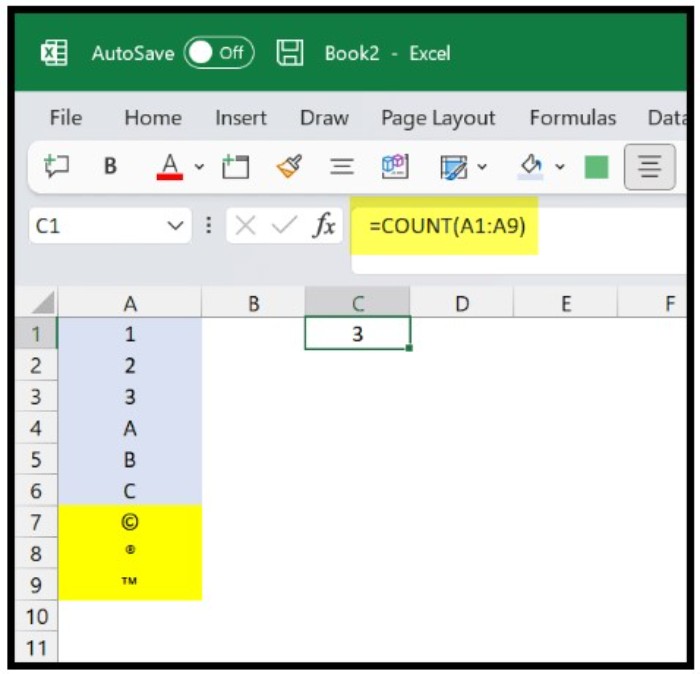
If you use the COUNT function for this range, it will return 3 as the result because there are only three numeric values out of 9 cells.
COUNT vs COUNTA (Function Difference with Example)

COUNT vs COUNTA (Function Difference with Example)

However, if you use the COUNTA function for the same range, it will return 9 as the result because all 9 cells contain some value.

Which Function is Better?

Both COUNT and COUNTA functions are helpful and straightforward to use, but in practical scenarios, COUNTA is more useful because it can count cells with any value, which is a more frequent situation than counting the cells with numbers only. Nevertheless, this doesn’t make the COUNT function less valuable as data analysts use it frequently.

Rate this post
41
325 Views
How to Count Total Number of Cells in ExcelPrevHow to Count Total Number of Cells in ExcelApril 27, 2023
Excel Word Count: Tips and MethodsApril 27, 2023Excel Word Count: Tips and MethodsNext

Leave a Reply Cancel reply

You must be logged in to post a comment.

Buy Windows 11 Professional MS Products CD Key
Buy Office 2021 Professional Plus Key Global For 5 PC
Top rated products
  • Kaspersky Small Office Security 15 PCs + 15 Mobiles + 2 Servers 1 Year Kaspersky Small Office Security 15 PCs + 15 Mobiles + 2 Servers 1 Year
    Rated 5.00 out of 5
    $201.00
  • Buy Windows 11 Professional MS Products CD Key Buy Windows 11 Professional MS Products CD Key
    Rated 5.00 out of 5
    $6.00
  • AVG Internet Security 2021 1 Device 1 Year Global AVG Internet Security 2021 1 Device 1 Year Global
    Rated 5.00 out of 5
    $11.00
  • Buy Office 2021 Professional Plus Key Global For 5 PC Buy Office 2021 Professional Plus Key Global For 5 PC
    Rated 5.00 out of 5
    $68.00
  • Avast SecureLine VPN 2021 2 Years 5 Devices Global Avast SecureLine VPN 2021 2 Years 5 Devices Global
    Rated 5.00 out of 5
    $47.00
Products
  • Microsoft Visio Standard 2021 Key 1PC Microsoft Visio Standard 2021 Key 1PC $13.00
  • Windows 10 Home Key Global Windows 10 Home Key Global
    Rated 4.81 out of 5
    $10.00
  • Windows Server 2025 Remote Desktop Services 50 Device Connections Windows Server 2025 Remote Desktop Services 50 Device Connections $25.00
  • Windows Server 2019 Datacenter Key Global Windows Server 2019 Datacenter Key Global
    Rated 4.75 out of 5
    $7.00
  • Project Professional 2024 Project Professional 2024 $43.00
  • Windows Server 2012 Remote Desktop Services 50 USER Connections Key Global Windows Server 2012 Remote Desktop Services 50 USER Connections Key Global
    Rated 4.69 out of 5
    $25.00
  • Windows 10 Education Key Global Windows 10 Education Key Global
    Rated 4.84 out of 5
    $9.00
  • Buy Windows 11 Home CD Key Global Buy Windows 11 Home CD Key Global
    Rated 4.73 out of 5
    $6.00
  • Microsoft Visio 2016 professional CD Key Global Microsoft Visio 2016 professional CD Key Global
    Rated 4.94 out of 5
    $28.50
  • SQL Server 2014 Standard SQL Server 2014 Standard $20.00
Product categories
  • Anti Virus
  • Microsoft Office
  • Microsoft Project
  • Microsoft Visio
  • Microsoft Visual
  • Microsoft Windows
  • Other Software
  • Uncategorized

Buffcom.net always brings the best digital products and services to you. Specializing in Office Software and online marketing services

BIG SALE 50% IN MAY

Microsoft Office
Microsoft Windows
Anti-Virus
Contact Us

Visit Us:

125 Division St, New York, NY 10002, USA

Mail Us:

buffcom.net@gmail.com

TERMS & CONDITIONS | PAYMENT GUIDE  | SHIPPING POLICY  | REFUND POLICY

Copyright © 2019 buffcom.net  All Rights Reserved.