
• Microsoft Office
  • Microsoft Windows
  • Other Software
    • Microsoft Visual
    • Microsoft Project
    • Microsoft Visio
    • Anti Virus
  • Blog
    • Word
    • Excel
    • Powerpoint
    • Software tricks/tips

No products in the cart.

  • Microsoft Office
  • Microsoft Windows
  • Other Software
    • Microsoft Visual
    • Microsoft Project
    • Microsoft Visio
    • Anti Virus
  • Blog
    • Word
    • Excel
    • Powerpoint
    • Software tricks/tips

No products in the cart.

  • Microsoft Office
  • Microsoft Windows
  • Other Software
    • Microsoft Visual
    • Microsoft Project
    • Microsoft Visio
    • Anti Virus
  • Blog
    • Word
    • Excel
    • Powerpoint
    • Software tricks/tips

No products in the cart.

  • Microsoft Office
  • Microsoft Windows
  • Other Software
    • Microsoft Visual
    • Microsoft Project
    • Microsoft Visio
    • Anti Virus
  • Blog
    • Word
    • Excel
    • Powerpoint
    • Software tricks/tips
Excel

3 Easy Ways to Get Month Names from Dates in Excel
0 Comments

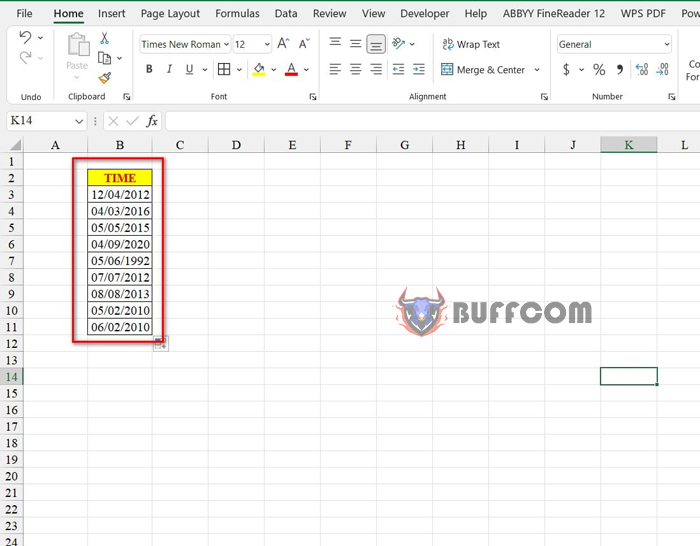
3 Easy Ways to Get Month Names from Dates in Excel. When processing a time column, you may want to extract the month or display the month name from that date. In this article, I will show you 3 easy ways to get the month name from a date in Excel. Let’s take a look at the following example data:
3 Easy Ways to Get Month Names from Dates in Excel

3 Easy Ways to Get Month Names from Dates in Excel

To get the month name based on the above data, you have three methods as follows:

Method 1: Get the month names from Custom Number Format

Steps to perform:
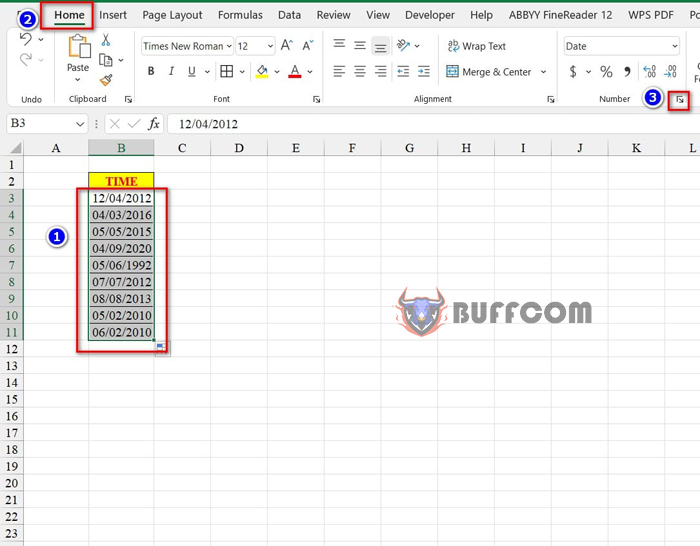
Step 1: Select the data range containing the time you want to display the month name.
Step 2: Go to the Home tab, click on the arrow next to the Number group.
3 Easy Ways to Get Month Names from Dates in Excel

3 Easy Ways to Get Month Names from Dates in Excel

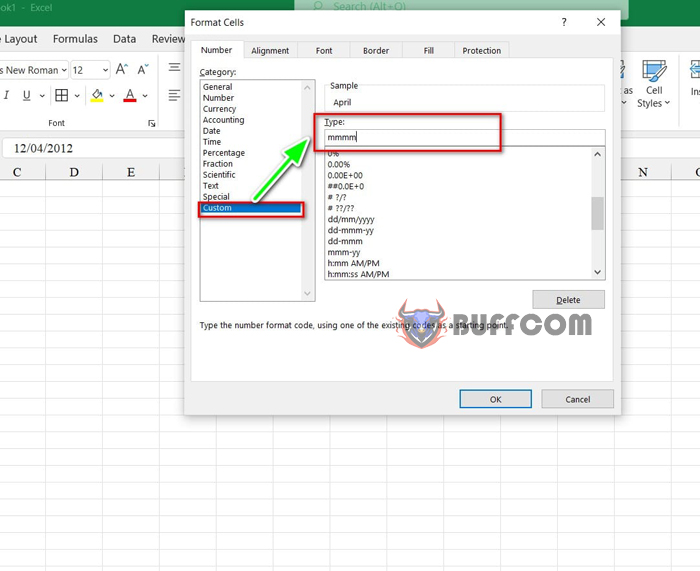
Step 3: The Format Cells dialog box appears. Choose Custom and type “mmmm” in the Type box.
3 Easy Ways to Get Month Names from Dates in Excel

3 Easy Ways to Get Month Names from Dates in Excel

Step 4: Press OK to display the result.
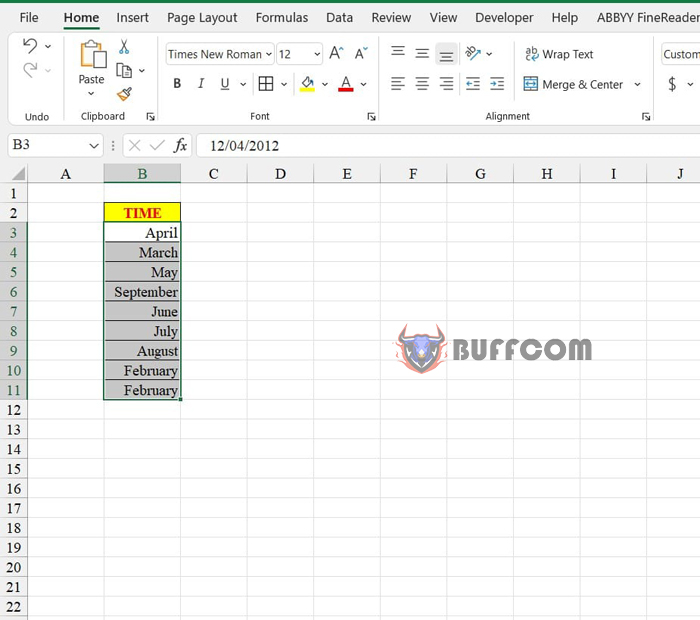
3 Easy Ways to Get Month Names from Dates in Excel

3 Easy Ways to Get Month Names from Dates in Excel

Method 2: Get the month names from the Text function

First, you select the cell to display the month name. Next, you enter the following formula: =TEXT(B3,”mmmm”)
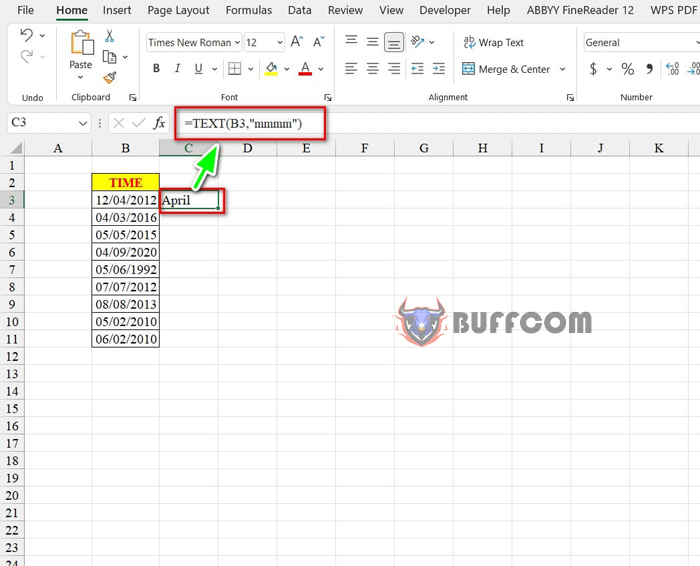
3 Easy Ways to Get Month Names from Dates in Excel

3 Easy Ways to Get Month Names from Dates in Excel

Finally, to display the remaining cells, you also select from the first cell to the last row and press Ctrl + D.
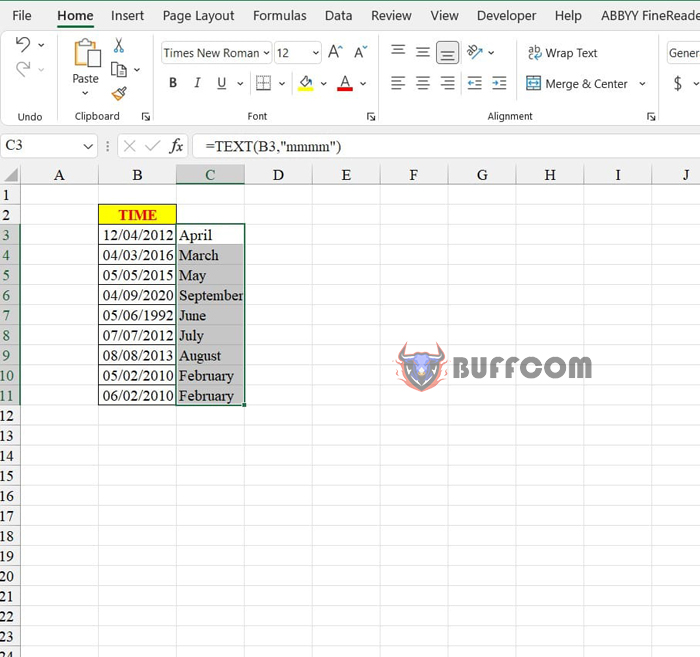
3 Easy Ways to Get Month Names from Dates in Excel

3 Easy Ways to Get Month Names from Dates in Excel

Moreover, to calculate the quarter based on the month, you use the following formula: =ROUNDUP(MONTH(B3)/3,0).
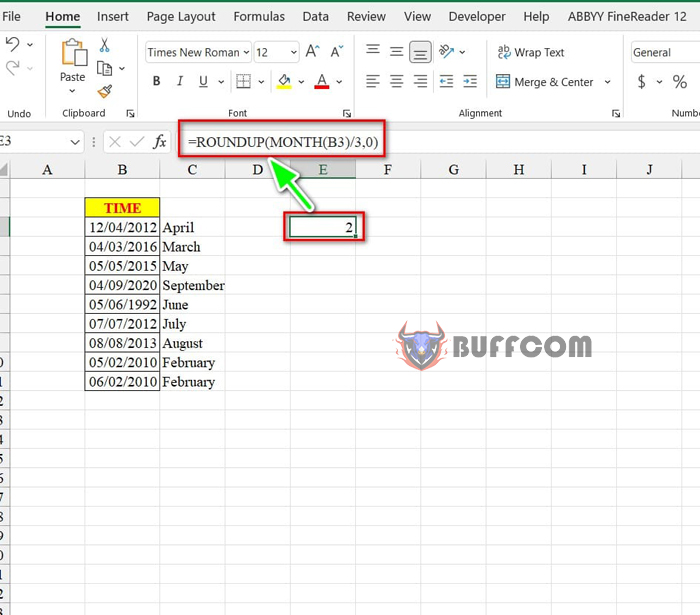
3 Easy Ways to Get Month Names from Dates in Excel

3 Easy Ways to Get Month Names from Dates in Excel

Method 3: Get the month names using Power Query

Steps to perform:
Step 1: Select any cell in the data table, then go to the Insert tab, select Table, and click OK to create a data table.
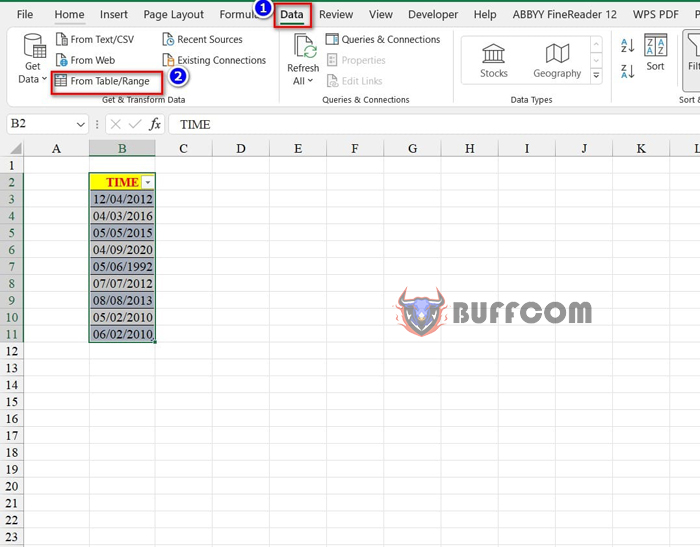
Step 2: In the data, go to the Data tab, select From Table/Range
3 Easy Ways to Get Month Names from Dates in Excel

3 Easy Ways to Get Month Names from Dates in Excel

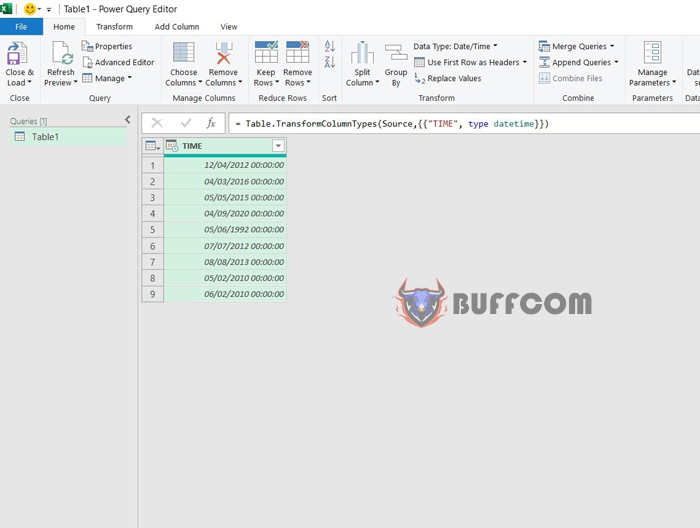
Step 3: The Power Query interface appears.
3 Easy Ways to Get Month Names from Dates in Excel

3 Easy Ways to Get Month Names from Dates in Excel

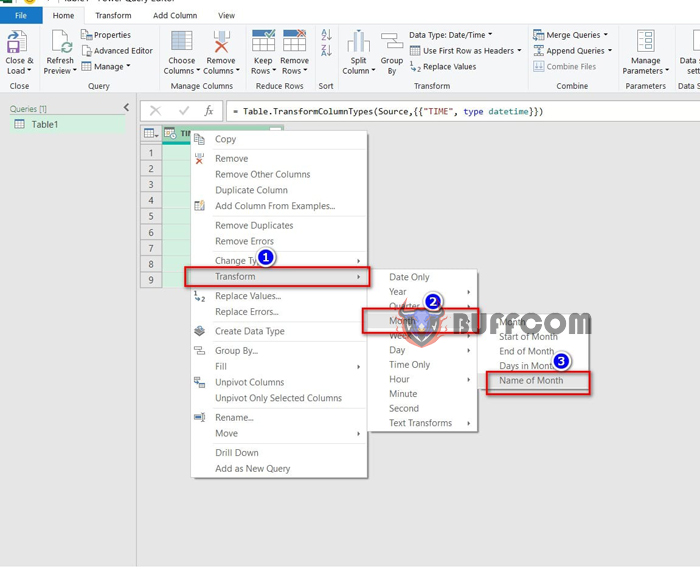
Step 4: Right-click on the column header, select Transform, then select Month, and then select Name of Month.
3 Easy Ways to Get Month Names from Dates in Excel

3 Easy Ways to Get Month Names from Dates in Excel

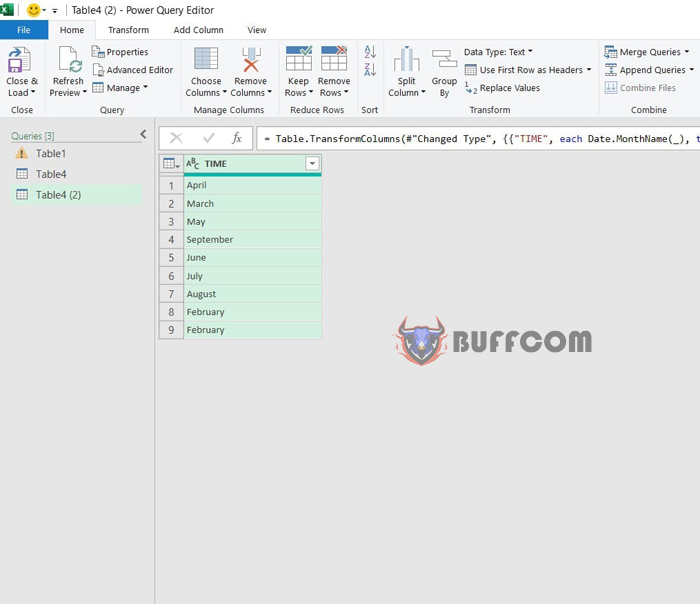
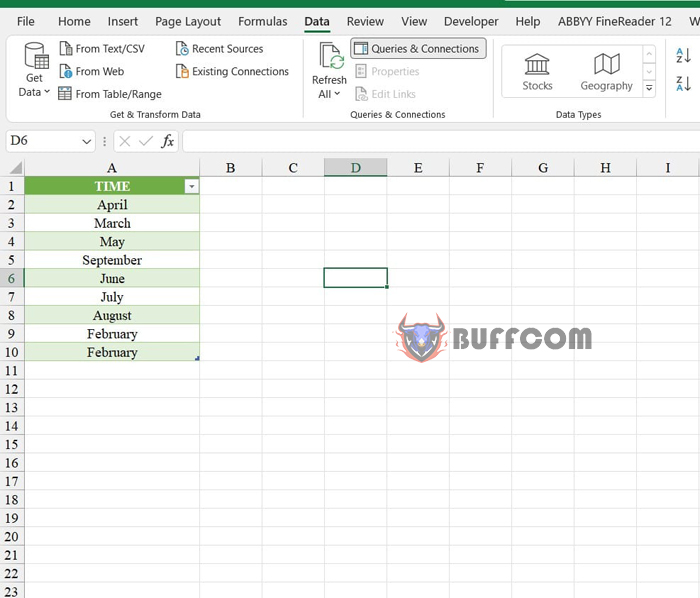
Step 5: The result is displayed.
3 Easy Ways to Get Month Names from Dates in Excel

3 Easy Ways to Get Month Names from Dates in Excel

Step 6: To exit the Power Query interface, go to the Home tab and click on Close & Load.
3 Easy Ways to Get Month Names from Dates in Excel

3 Easy Ways to Get Month Names from Dates in Excel

So, I have just shown you 3 ways to display month names from dates in Excel. I hope you can successfully apply these methods. If you find this article helpful, don’t forget to rate it below! Best regards from Buffcom.


Rate this post
55
319 Views
3 Tips for Quick Source Query Navigation in ExcelPrev3 Tips for Quick Source Query Navigation in ExcelMarch 15, 2023
How to Display Negative Numbers in Parentheses in ExcelMarch 15, 2023How to Display Negative Numbers in Parentheses in ExcelNext

Leave a Reply Cancel reply

You must be logged in to post a comment.

Buy Windows 11 Professional MS Products CD Key
Buy Office 2021 Professional Plus Key Global For 5 PC
Top rated products
  • Kaspersky Total Security 2021 1 year 5 devices key Global Kaspersky Total Security 2021 1 year 5 devices key Global
    Rated 5.00 out of 5
    $46.00
  • Avast Premium Security 2021 Avast Premium Security 2021 1 Device 1 Year Global
    Rated 5.00 out of 5
    $11.00
  • Trend Micro Internet Security 3 Devices 1 Year Key GLOBAL Trend Micro Internet Security 3 Devices 1 Year Key GLOBAL
    Rated 5.00 out of 5
    $17.00
  • Windows 11 Pro Key Global Windows 11 Pro Key Global
    Rated 5.00 out of 5
    $6.00
  • AVG Internet Security 2021 10 Devices 2 Years Global AVG Internet Security 2021 10 Devices 2 Years Global
    Rated 5.00 out of 5
    $42.20
Products
  • AVG Ultimate 2021 with Antivirus + Cleaner, Secure VPN 10 Devices 2 Years AVG Ultimate 2021 with Antivirus + Cleaner, Secure VPN 10 Devices 2 Years
    Rated 5.00 out of 5
    $47.00
  • Windows 11 Pro Product Activation Key Windows 11 Pro Product Activation Key
    Rated 5.00 out of 5
    $6.00
  • Microsoft SQL Server 2019 Enterprise Microsoft SQL Server 2019 Enterprise $39.00
  • Microsoft Office 2019 Home and Student for PC Key Global bind to your Microsoft account Microsoft Office 2019 Home and Student for PC Key Global bind to your Microsoft account
    Rated 4.95 out of 5
    $58.00
  • Buy Windows 11 Home CD Key Global Buy Windows 11 Home CD Key Global
    Rated 4.73 out of 5
    $6.00
  • Microsoft Office Home And Business 2016 For Mac Key Global Bind Microsoft Account Microsoft Office Home And Business 2016 For Mac Key Global Bind Microsoft Account
    Rated 4.92 out of 5
    $15.00
  • Project Professional 2024 Project Professional 2024 $43.00
  • Microsoft Project 2019 Professional Key Global Microsoft Project 2019 Professional - 5 PC
    Rated 4.97 out of 5
    $12.00
  • Buy Office 2021 Professional Plus Key Global For 5 PC Buy Office 2021 Professional Plus Key Global For 5 PC
    Rated 5.00 out of 5
    $68.00
  • Trend Micro Maximum Security 3 Devices 1 Year key Global Trend Micro Maximum Security 3 Devices 1 Year key Global
    Rated 5.00 out of 5
    $15.00
Product categories
  • Anti Virus
  • Microsoft Office
  • Microsoft Project
  • Microsoft Visio
  • Microsoft Visual
  • Microsoft Windows
  • Other Software
  • Uncategorized

Buffcom.net always brings the best digital products and services to you. Specializing in Office Software and online marketing services

BIG SALE 50% IN MAY

Microsoft Office
Microsoft Windows
Anti-Virus
Contact Us

Visit Us:

125 Division St, New York, NY 10002, USA

Mail Us:

buffcom.net@gmail.com

TERMS & CONDITIONS | PAYMENT GUIDE  | SHIPPING POLICY  | REFUND POLICY

Copyright © 2019 buffcom.net  All Rights Reserved.