• Microsoft Office
  • Microsoft Windows
  • Other Software
    • Microsoft Visual
    • Microsoft Project
    • Microsoft Visio
    • Anti Virus
  • Blog
    • Word
    • Excel
    • Powerpoint
    • Software tricks/tips

No products in the cart.

  • Microsoft Office
  • Microsoft Windows
  • Other Software
    • Microsoft Visual
    • Microsoft Project
    • Microsoft Visio
    • Anti Virus
  • Blog
    • Word
    • Excel
    • Powerpoint
    • Software tricks/tips

No products in the cart.

  • Microsoft Office
  • Microsoft Windows
  • Other Software
    • Microsoft Visual
    • Microsoft Project
    • Microsoft Visio
    • Anti Virus
  • Blog
    • Word
    • Excel
    • Powerpoint
    • Software tricks/tips

No products in the cart.

  • Microsoft Office
  • Microsoft Windows
  • Other Software
    • Microsoft Visual
    • Microsoft Project
    • Microsoft Visio
    • Anti Virus
  • Blog
    • Word
    • Excel
    • Powerpoint
    • Software tricks/tips
Excel

How to Calculate the Original Price from a Discounted Price
0 Comments

How to Calculate the Original Price from a Discounted Price. In this article, we will discuss how to calculate the original price or total amount based on a discounted price and discount percentage using Excel.How to Calculate the Original Price 1
How to Calculate the Original Price from a Discounted Price

Scenario:

When working with percentages in Excel, there are situations where we need to determine the total amount based on a given discount percentage and the discounted price. This involves finding the amount before the discount was applied.

How can we calculate the total amount?

We can apply a basic mathematical observation used in Excel. Excel treats percentage values as decimals. For example, 20% is represented as 0.2 in Excel. By dividing the discounted amount by the discount percentage, we can obtain the total amount.

Generic formula:How to Calculate the Original Price 2
Total amount = discounted amount / discount percentage

Discounted amount:

The price after the discount has been applied. Discount percentage: The percentage value representing the discount.

Example:

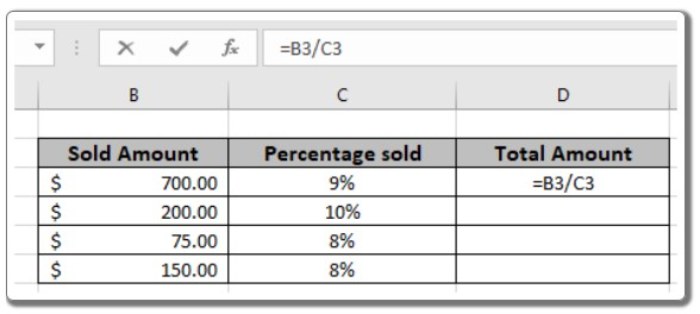
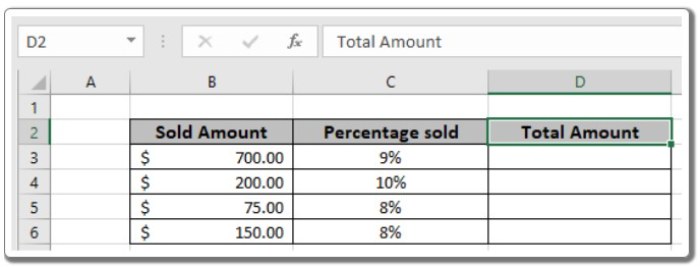
To better understand the concept, let’s run the formula on the following example. We will use the generic formula to calculate the total value for the given data.

  • Use the formula in cell D3: = B3 / C3How to Calculate the Original Price 3

The formula is shown in the image above, where cell references are used as input values.How to Calculate the Original Price 4
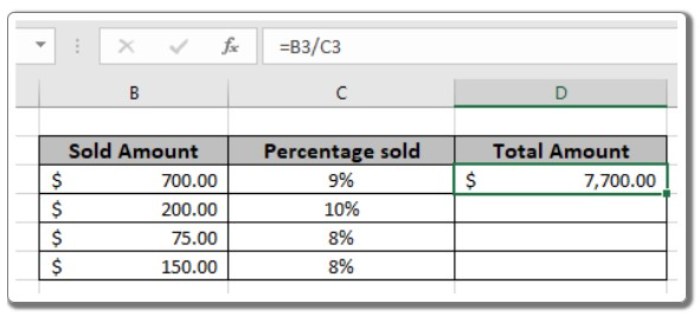
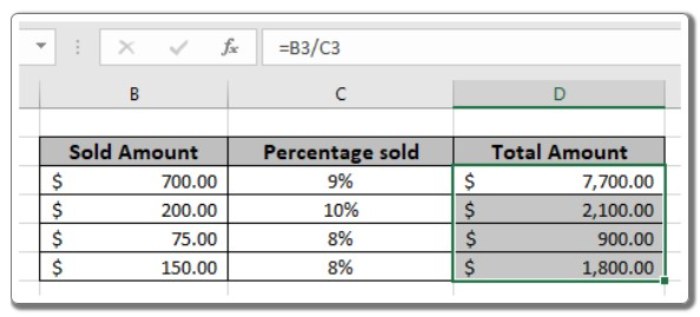
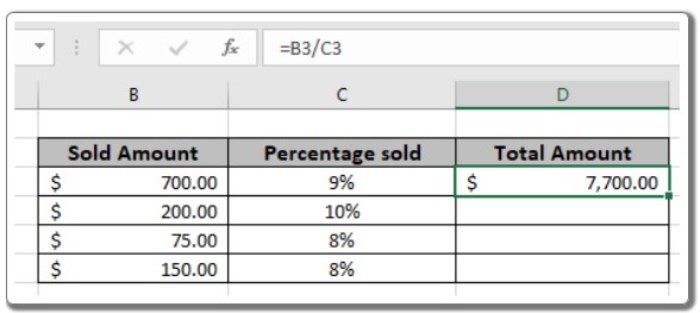
  • As seen in the snapshot, the initial amount is $7,700. Copy the formula to other cells using the Ctrl + D shortcut to calculate the new amounts for the remaining values in the table.How to Calculate the Original Price 5

By utilizing this mathematical formula, we can determine the total amount based on a discounted price and percentage in Excel.


Rate this post
42
309 Views
How to Add Text to a Formula in ExcelPrevHow to Add Text to a Formula in ExcelJune 26, 2023
How To Speed Up Windows 10 StartupJune 27, 2023How To Speed Up Windows 10 StartupNext

Leave a Reply Cancel reply

You must be logged in to post a comment.

Buy Windows 11 Professional MS Products CD Key
Buy Office 2021 Professional Plus Key Global For 5 PC
Top rated products
  • Kaspersky Total Security 2021 1 year 1 device key Global Kaspersky Total Security 2021 1 year 1 device key Global
    Rated 5.00 out of 5
    $27.00
  • Avast Ultimate Suite 2021 2 Years 10 Devices Global Avast Ultimate Suite 2021 2 Years 10 Devices Global
    Rated 5.00 out of 5
    $77.00
  • Buy Windows 11 Pro CD Key License Buy Windows 11 Pro CD Key License
    Rated 5.00 out of 5
    $6.00
  • Kaspersky Total Security 2021 1 year 5 devices key Global Kaspersky Total Security 2021 1 year 5 devices key Global
    Rated 5.00 out of 5
    $46.00
  • Avast Premium Security 2021 Avast Premium Security 2021 1 Device 1 Year Global
    Rated 5.00 out of 5
    $11.00
Products
  • Windows Server 2022 Remote Desktop Services User Connections (50) Cal Key Global Windows Server 2022 Remote Desktop Services User Connections (50) Cal Key Global
    Rated 5.00 out of 5
    $22.00
  • Office 2019 Professional Plus Key Global Bind to your Microsoft Account Office 2019 Professional Plus Key Global Bind to your Microsoft Account
    Rated 4.97 out of 5
    $49.00
  • Buy Windows 11 Home CD Key Global Buy Windows 11 Home CD Key Global
    Rated 4.73 out of 5
    $6.00
  • Microsoft Visual Studio Enterprise 2022 For 1 PC Microsoft Visual Studio Enterprise 2022 For 1 PC $19.00
  • Windows Server 2022 Standard Key Global Windows Server 2022 Standard Key Global
    Rated 4.10 out of 5
    $7.00
  • Windows Server 2016 Datacenter Key Global Windows Server 2016 Datacenter Key Global
    Rated 4.74 out of 5
    $10.00
  • Windows 10 Pro N Key Global Windows 10 Pro N Key Global
    Rated 4.83 out of 5
    $10.00
  • Microsoft Visio 2019 professional Key Global Bind to your Microsoft Account Microsoft Visio 2019 professional Key Global Bind to your Microsoft Account
    Rated 4.96 out of 5
    $12.00
  • Kaspersky Internet Security 2021 1 year 1 device key Global Kaspersky Internet Security 2021 1 year 1 device key Global
    Rated 5.00 out of 5
    $24.00
  • Microsoft Office Home And Business 2019 CD Key for MAC Global Microsoft Office Home And Business 2019 CD Key for MAC Global
    Rated 4.95 out of 5
    $30.00
Product categories
  • Anti Virus
  • Microsoft Office
  • Microsoft Project
  • Microsoft Visio
  • Microsoft Visual
  • Microsoft Windows
  • Other Software
  • Uncategorized

Buffcom.net always brings the best digital products and services to you. Specializing in Office Software and online marketing services

BIG SALE 50% IN MAY

Microsoft Office
Microsoft Windows
Anti-Virus
Contact Us

Visit Us:

125 Division St, New York, NY 10002, USA

Mail Us:

buffcom.net@gmail.com

TERMS & CONDITIONS | PAYMENT GUIDE  | SHIPPING POLICY  | REFUND POLICY

Copyright © 2019 buffcom.net  All Rights Reserved.