• Microsoft Office
  • Microsoft Windows
  • Other Software
    • Microsoft Visual
    • Microsoft Project
    • Microsoft Visio
    • Anti Virus
  • Blog
    • Word
    • Excel
    • Powerpoint
    • Software tricks/tips

No products in the cart.

  • Microsoft Office
  • Microsoft Windows
  • Other Software
    • Microsoft Visual
    • Microsoft Project
    • Microsoft Visio
    • Anti Virus
  • Blog
    • Word
    • Excel
    • Powerpoint
    • Software tricks/tips

No products in the cart.

  • Microsoft Office
  • Microsoft Windows
  • Other Software
    • Microsoft Visual
    • Microsoft Project
    • Microsoft Visio
    • Anti Virus
  • Blog
    • Word
    • Excel
    • Powerpoint
    • Software tricks/tips

No products in the cart.

  • Microsoft Office
  • Microsoft Windows
  • Other Software
    • Microsoft Visual
    • Microsoft Project
    • Microsoft Visio
    • Anti Virus
  • Blog
    • Word
    • Excel
    • Powerpoint
    • Software tricks/tips
Word

How to quickly show or hide crop marks in Word?
0 Comments

To quickly show or hide crop marks in Word, follow these steps:

Method 1:

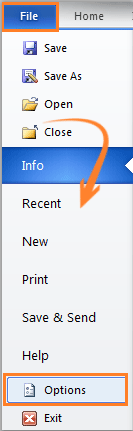
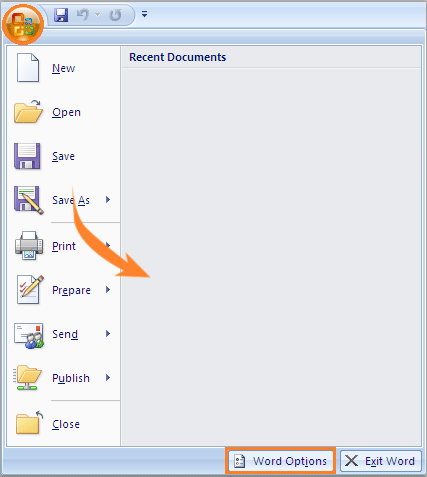
  1. Click on the Office button (Word 2007) or the File tab (Word 2010 and later) in the top left corner of the Word window.
  2. Select Word Options (Word 2007) or Options (Word 2010 and later).
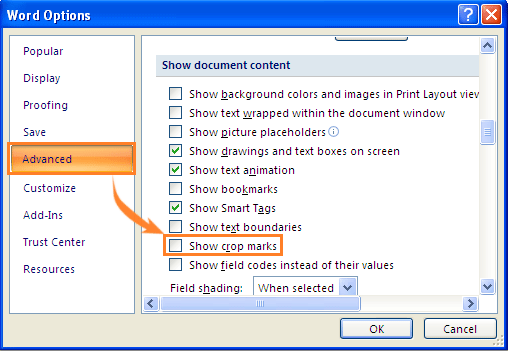
  3. In the Word Options dialog box, click on Advanced.How to quickly show or hide crop marks in Word
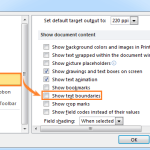
  4. Scroll down to the “Show document content” section.
  5. Check the box for Show crop marks to show the crop marks, or uncheck it to hide them.
  6. Click OK to apply the changes.How to quickly show or hide crop marks in Word2

Method 2:

  1. Click on the File tab.
  2. Click on Options.
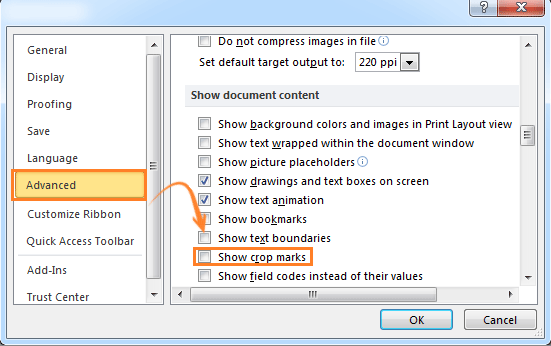
  3. In the Word Options dialog box, click on Advanced.
  4. Scroll down to the “Show document content” section.How to quickly show or hide crop marks in Word3
  5. Check the box for Show crop marks to show the crop marks, or uncheck it to hide them.
  6. Click OK to apply the changes.
    How to quickly show or hide crop marks in Word

    How to quickly show or hide crop marks in Word

Using either of these methods, you can quickly toggle the visibility of crop marks in your Word document.
Rate this post
53
210 Views
How to show or hide text boundaries in Word?PrevHow to show or hide text boundaries in Word?April 25, 2024
How to convert text box to frame in wordMay 2, 2024How to convert text box to frame in wordNext
Buy Windows 11 Professional MS Products CD Key
Buy Office 2021 Professional Plus Key Global For 5 PC
Top rated products
  • Kaspersky Internet Security 2021 1 year 5 devices key Global Kaspersky Internet Security 2021 1 year 5 devices key Global
    Rated 5.00 out of 5
    $45.00
  • Windows Server 2022 Datacenter Key Global Windows Server 2022 Datacenter Key Global
    Rated 5.00 out of 5
    $7.00
  • Kaspersky Small Office Security 10 PCs + 10 Mobiles + 1 Server 1 Year Kaspersky Small Office Security 10 PCs + 10 Mobiles + 1 Server 1 Year
    Rated 5.00 out of 5
    $164.50
  • Avast Ultimate Suite 2021 1 Year 10 Devices Global Avast Ultimate Suite 2021 1 Year 10 Devices Global
    Rated 5.00 out of 5
    $54.00
  • Windows 11 Pro Key Global Windows 11 Pro Key Global
    Rated 5.00 out of 5
    $6.00
Products
  • Windows Server 2016 Datacenter Key Global Windows Server 2016 Datacenter Key Global
    Rated 4.74 out of 5
    $10.00
  • Windows Server 2019 Essentials Key Global Windows Server 2019 Essentials Key Global
    Rated 4.71 out of 5
    $7.00
  • Microsoft Office Professional Plus 2013 retail CD Key Global Microsoft Office Professional Plus 2013 retail CD Key Global
    Rated 4.97 out of 5
    $11.00
  • Buy Windows 11 Pro CD Key License Buy Windows 11 Pro CD Key License
    Rated 5.00 out of 5
    $6.00
  • Office 2024 Home and Student Office 2024 Home and Student $88.00
  • Kaspersky Plus - 1 Device 1 Year - GLOBAL Kaspersky Plus - 1 Device 1 Year - GLOBAL $23.00
  • Windows Server 2025 Remote Desktop Services 50 User Connections Windows Server 2025 Remote Desktop Services 50 User Connections $25.00
  • Microsoft Visio Standard 2021 Key 1PC Microsoft Visio Standard 2021 Key 1PC $13.00
  • Project Professional 2013 Microsoft Project Professional 2013 - 1 PC $9.00
  • Microsoft Visual Studio Enterprise 2019 For 1 PC Microsoft Visual Studio Enterprise 2019 For 1 PC
    Rated 4.88 out of 5
    $15.00
Product categories
  • Anti Virus
  • Microsoft Office
  • Microsoft Project
  • Microsoft Visio
  • Microsoft Visual
  • Microsoft Windows
  • Other Software
  • Uncategorized

Buffcom.net always brings the best digital products and services to you. Specializing in Office Software and online marketing services

BIG SALE 50% IN MAY

Microsoft Office
Microsoft Windows
Anti-Virus
Contact Us

Visit Us:

125 Division St, New York, NY 10002, USA

Mail Us:

buffcom.net@gmail.com

TERMS & CONDITIONS | PAYMENT GUIDE  | SHIPPING POLICY  | REFUND POLICY

Copyright © 2019 buffcom.net  All Rights Reserved.